


That could explain why you found that “The sound does not change when I turn wi-fi off”.Six extraneous SSIDs right now.









That could explain why you found that “The sound does not change when I turn wi-fi off”.Six extraneous SSIDs right now.
This may have been covered earlier but if so I couldn't find it; has anyone directly compared a SwitchX/WifiX to a NA Tempus with or without a Muon?That could explain why you found that “The sound does not change when I turn wi-fi off”.


Thanks for sharing! Where did you purchase them?Hello, I'm new here, but I've been reading along for some time. I'd like to add another switch manufacturer to the mix. Paradin Audio produces everything itself and uses granite for the housing. I have the Momento and the Argento in my system, and these two products have given my system a musical integrity that I've never experienced before. Thanks to the isolator and the switch, the music becomes more analog, everything is better separated than I have experienced with other switches and isolators. The switch was presented in Mono and Stereo the other day.
Here is a link: https://www.monoandstereo.com/paradin-audio-momento-ethernet-switch/
Paradin Audio will be exhibiting this year in Hamburg at the Nord Deutschen Hifitage at the Avantgarde-Acoustic booth. Best regards
I believe too many comparisons between audiophile switches just treat them as different‑quality ‘boxes’, but in reality we should consider the topology and philosophy behind them. For example, with something like SwitchX/WifiX you’re not simply getting a ‘better switch’ but you’re building a separate, isolated audio‑only sub‑network (often with its own WiFi bridge). That removes all broadcast/multicast/house‑LAN traffic from the audio path.This may have been covered earlier but if so I couldn't find it; has anyone directly compared a SwitchX/WifiX to a NA Tempus with or without a Muon?
The two posts above are much appreciated and well put. Currently I run copper from my router to a cheap but (so far) reliable StarTech converter, about 40 feet of fiber to another StarTech then an Aardvark Link to my NUC server. The Link, which is a filter, made a small but audible improvement. So my thought now is to replace one of the StarTechs with either a Switch X or Tempus, both of which will do the conversion, and try the Link from either to the server. I would add the Wifi X to the Switch since it's necessary for control with my iPad. And, I really like the idea of the independent network it provides. I would also add the Muon Pro to the Tempus to get the max filtering effect. Those are my choices; fiber conversion, some filtering and an isolated network with the Switch X / Wifi X or what seems to be recognized as very top quality filtering and fiber conversion with the Tempus/Muon. I should add I would remove the Link if using the Muon. I'm hoping either approach will be a big step up over what I currently have. Any further thoughts?...I agree @Di-fi
Because my inability to manage a lot of the IT-related/network infrastructure myself, I read a lot, understand as best as I can, and make decisions based on that...as well as a level of trust in various manufacturers' info.
I tried a v-lan some years ago with that EdgeX device, recommended and well regarded. What a nightmare. Gave up. IMO that is NOT user friendly.
I used some daisy-chained Ciscos, later adding a modded Buffalo switch, and various USB or LAN filters. They all worked and it was incremental improvement up the ladder. One could stop anywhere along the way.
But when fiber came to the neighborhood, I jumped in.
Dedicated fiber to audio room. Everything else on copper from a different ISP.
For me, that's an UberLan! No traffic management, switch layer negotiation research, buffer settings, etc., etc.
Then Taiko came out with network gear, and I added a switch/DCD. Later the router.
I recognize this is not a viable solution for all, but to your point: depending upon where I was, my knowledge/ability level, budget, new product development, I could make various choices that were all improvements at the time, based on my topology and usage.
Frankly, I think there are currently excellent options in the marketplace for improved network/streaming infrastructure. When we had 50 dollar Cisco 2960s to explore, we did. But smart guys found a market and used their knowledge to create new solutions. Pick a strategy that works for you...which is kind of what you and others are getting at. Cheers.
I have a Draytek router and that had great software for configuring VLANs and that really made a difference. I now have a dedicated vlan for audio which goes out of one port on my router and the rest of the house traffic is in the other. Very noticeable upgrade, event better that it was free just reading an online guide on the Draytek website. So while you have now a much better dedicated lan, for us mere mortals vlans are worth exploring. As part of the overall network setup as I there does not seem to be any silver bullets. More you need a full magazine of bullets aimed at a steaming system.I tried a v-lan some years ago with that EdgeX device, recommended and well regarded. What a nightmare. Gave up. IMO that is NOT user friendly.
Thanks for the thoughtful reply. This is exactly the kind of experience I was hoping would show up in the thread. Your story really shows why it makes sense to look at the bigger picture instead of only comparing boxes. I know this touches a bit more on the wider setup, but only because the topology behind these devices makes such a big difference....I agree @Di-fi
Because my inability to manage a lot of the IT-related/network infrastructure myself, I read a lot, understand as best as I can, and make decisions based on that...as well as a level of trust in various manufacturers' info.
I tried a v-lan some years ago with that EdgeX device, recommended and well regarded. What a nightmare. Gave up. IMO that is NOT user friendly.
I used some daisy-chained Ciscos, later adding a modded Buffalo switch, and various USB or LAN filters. They all worked and it was incremental improvement up the ladder. One could stop anywhere along the way.
But when fiber came to the neighborhood, I jumped in.
Dedicated fiber to audio room. Everything else on copper from a different ISP.
For me, that's an UberLan! No traffic management, switch layer negotiation research, buffer settings, etc., etc.
Then Taiko came out with network gear, and I added a switch/DCD. Later the router.
I recognize this is not a viable solution for all, but to your point: depending upon where I was, my knowledge/ability level, budget, new product development, I could make various choices that were all improvements at the time, based on my topology and usage.
Frankly, I think there are currently excellent options in the marketplace for improved network/streaming infrastructure. When we had 50 dollar Cisco 2960s to explore, we did. But smart guys found a market and used their knowledge to create new solutions. Pick a strategy that works for you...which is kind of what you and others are getting at. Cheers.
Yesterday I posted to the router thread that I believed I had successfully created an isolated audio VLAN. I deleted the post because I found that checking the isolate option doesn’t actually isolate the VLAN from the default network. Grrr.I tried a v-lan some years ago with that EdgeX device, recommended and well regarded. What a nightmare. Gave up. IMO that is NOT user friendly.
I'm definitely a novice and don't want any part of that process. After running Fing this morning I found I have twelve devices running on my LAN, only one of which was connected to my audio system--my server. So that pretty much did it for my decision between the Tempus and Switch X. I'll be ordering the Switch X/ Wifi X combo next week. Down the road I may give the Muon or the new Muon2 a try when it's available.Yesterday I posted to the router thread that I believed I had successfully created an isolated audio VLAN. I deleted the post because I found that checking the isolate option doesn’t actually isolate the VLAN from the default network. Grrr.
I believe I succeeded today by also adding firewall rules that drops “LAN in” traffic from each segment to the other. I’m certain now that it’s isolated. I have been trying to punch open a hole that at least allows my NAS to be accessed from the audio VLAN. So effing frustrating as nothing seems to work as it should - but clearly the fault is with my understanding. Definitely not something that novices should think of taking on.
Tonight I will do some listening comparisons to see if it’s worth the hassle. It looks like I should be able to A/B isolation by toggling on/off the rules.
After running Fing this morning I found I have twelve devices running on my LAN, only one of which was connected to my audio system--my server. So that pretty much did it for my decision between the Tempus and Switch X. I'll be ordering the Switch X/ Wifi X combo next week. Down the road I may give the Muon or the new Muon2 a try when it's available.
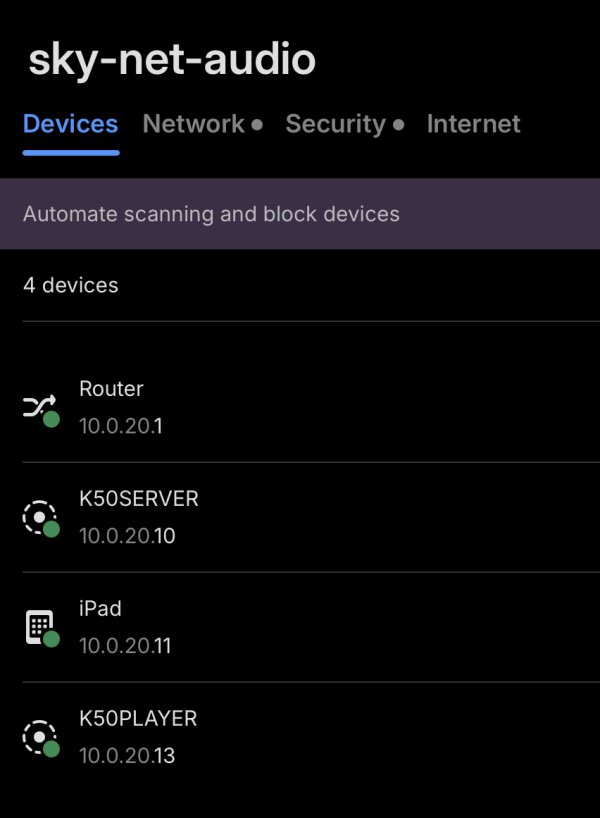
It sure should. I'll be very interested to hear your results.As I recently mentioned on one of these threads, I have over 60 devices on my home network as I have many IoT devices. So if VLAN is going to v be worth the effort, my network provides a good test case. The image below shows a Fing scan of the new audio VLAN.
I’m actually not really a novice when it comes to firewall configuration as I’ve had some say in their configuration at work. My challenge has been more with how to configure things in the Unifi controller. That software is generally super easy to use, but the new revamped policy section makes it more challenging as the help guides seem to all show screenshots from the previous configuration screens. Grrr.
View attachment 162633
I actually had it backwards. The screenshots I’ve been seeing in the help guides are based on UniFi’s zone-based firewall functionality, which isn’t available to me as I have an older cloud gateway. What I’ve read indicates that this new capability makes it easier to configure rules so I should probably upgrade to a current model.My challenge has been more with how to configure things in the Unifi controller. That software is generally super easy to use, but the new revamped policy section makes it more challenging as the help guides seem to all show screenshots from the previous configuration screens.
I'll be very interested to hear your results.
Lately, I’ve ended up streaming almost exclusively instead of managing local files, so there’s no “door” or extra NAS needed. My setup now includes a 4G router with Wi‑Fi switched off and a Farad3 power supply, an audio subnet containing only audio/network devices with fixed IP addresses, a low-noise access point on 2.4 GHz (with unnecessary services disabled, low transmission power, and connected to the switch), and two excellent Veridion Ethernet cables running from the router to the switch and from the server/streamer to the switch.In my own experience, it’s rarely a single “magic” tweak. More often, it’s a combination of a few small adjustments,


 | Steve Williams Site Founder | Site Owner | Administrator |  | Ron Resnick Site Owner | Administrator |  | Julian (The Fixer) Website Build | Marketing Managersing |