

I looked through the V4 configuration screens, but did not see these options. Please explain how we civilians can accomplish your recommended changes. Thanks.20 MHz channel width.
Manual channel selection rather than auto.
Transmit power reduced to the lowest level that remains stable.
LEDs turned off.
All nonessential services disabled









REVIEW: The best yet most affordable network switch (TPLink WR902AC)
- Thread starter keithc
- Start date
You are using an out of date browser. It may not display this or other websites correctly.
You should upgrade or use an alternative browser.
You should upgrade or use an alternative browser.

Right on. You had better luck than I, but it might be because I opted for the travel router that supports gigabit. The instructions Keith provided can’t be performed exactly as described. Frustrating as heck so I will likely bail on it.Success. Taking your suggestion before dragging my old windows laptop out I tried again on my iPhone. I omitted http:// from the address when I entered it in Safari and it worked. It was a PITA using my phone for this kind of thing but I completed the setup process with no apparent problem.
I did also purchase the recommended device so I will likely try configuring that instead.

One practical note from trying this myself. On the WR902AC, many of the useful WiFi and system settings are only accessible when the unit is in AP mode. In client mode, the interface is much more limited it seems. Sofar I played with the settings w/o audible conclusions yet.I looked through the V4 configuration screens, but did not see these options. Please explain how we civilians can accomplish your recommended changes. Thanks.
What seems to work best is to first put the WR902AC in AP mode, exactly as in @keithc setup instructions , adjust the relevant settings, and only then switch it to client mode. Some use the software setting, others use the physical switch on the side. Both seem to work, but switching modes can reset or partially overwrite earlier settings, so it is worth double checking afterward.
In my case I also lost settings once when changing modes, so it is important to go back and verify things like transmit power, channel width, and LEDs after the final mode switch. So I did not find a reliable way to see if settings are applied. But for example the LEDs stay off also once switched to client mode.

For people who want to take this project further, you may consider trying this model "TL-WR802N" instead. This is wireless N only router and has no external USB port feature so:
1. You don't need to turn off 5GHz function (and N module only sounds cleaner than module with 5GHz support)
2. You don't need to turn off USB feature
Also, this WR802N model has better build quality for internal components, better antenna reception. There's no actual merit to buy WR902AC just to disable 5GHz mode and USB feature when you can buy WR802N that came without one. Less internal noise and also cheaper too.
WR802N model is still active with firmware updates being rolled out in this year 2025 too. So I believe it shouldn't be hard to find this model and try one. You can check the details from here.
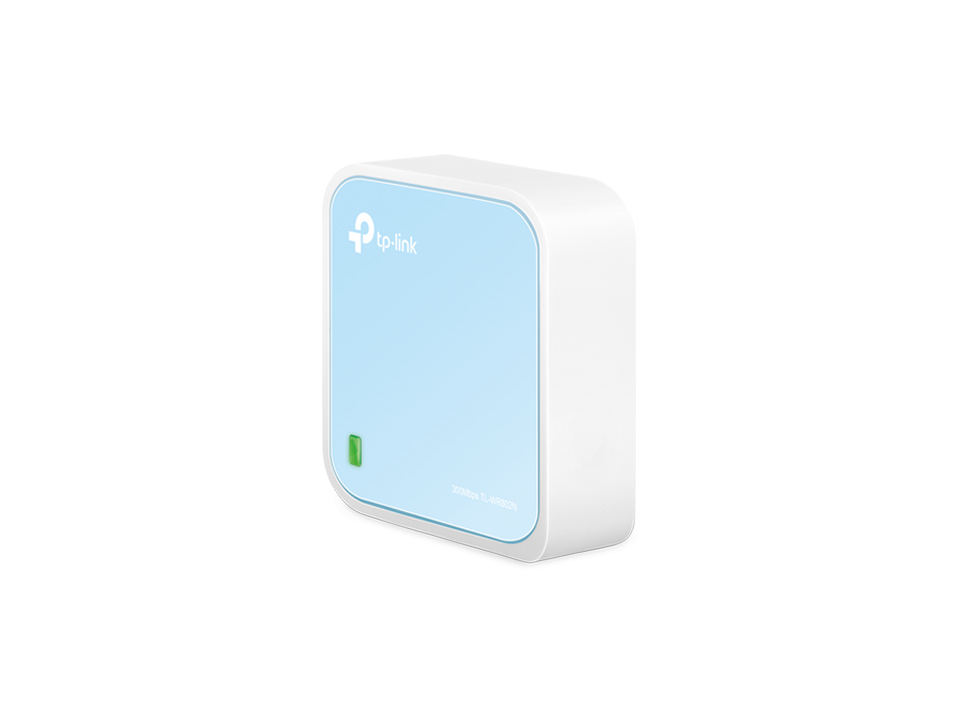
 www.tp-link.com
Testing AP mode on WR702N today made me wondered how much I can improve it with hardware modding. OpenWRT is also working with WR802N too so I will buy one to play around with later.
Regards,
Keetakawee
1. You don't need to turn off 5GHz function (and N module only sounds cleaner than module with 5GHz support)
2. You don't need to turn off USB feature
Also, this WR802N model has better build quality for internal components, better antenna reception. There's no actual merit to buy WR902AC just to disable 5GHz mode and USB feature when you can buy WR802N that came without one. Less internal noise and also cheaper too.
WR802N model is still active with firmware updates being rolled out in this year 2025 too. So I believe it shouldn't be hard to find this model and try one. You can check the details from here.
300Mbps Wireless N Nano Router
A pocket-sized Wireless N router travels effortlessly. 300 Mbps WiFi speed on a 2.4 GHz band ensures lag-free video streaming and online gaming.
www.tp-link.com
Testing AP mode on WR702N today made me wondered how much I can improve it with hardware modding. OpenWRT is also working with WR802N too so I will buy one to play around with later.
Regards,
Keetakawee
For people who want to take this project further, you may consider trying this model "TL-WR802N" instead. This is wireless N only router and has no external USB port feature so:
1. You don't need to turn off 5GHz function (and N module only sounds cleaner than module with 5GHz support)
2. You don't need to turn off USB feature
I'm confused -- you posted about how you found wifi to be lower performing than hardwire but yet you're recommending the WR802N?
I'm confused -- you posted about how you found wifi to be lower performing than hardwire but yet you're recommending the WR802N?
I didn't find client mode working well in my system but I did say access point mode can improve performance in my system compared to stock router. In real life I use both wired and wireless so I don't see the point to antagonize WiFi unless I can live with USB to ethernet adapter on my iPad, which I don't lol.
If someone finds WR902AC performing good in his system, trying WR802N should perform better for audiophile purposes with reasons I explained in previous post.
I recommended WR802N model because you're recommending people to buy WR902AC and turn off 5GHz WiFi and USB port feature to reduce noise. So why not buy WR802N that doesn't come with 5GHz and USB port feature in the first place?
Regards,
Keetakawee
In this setup, even with normal ethernet cable from network switch and USB power from streamer can improve audio performance over WiFi from modem router provided by internet service provider.
Why? Because my iPad is communicating with low powered and isolated wifi access point running on lowest latency mode so this reduces workload and interference on modem router.
Since most streamers often come with USB port and have good power supply feeding it, plugging USB port from streamer directly can sound better than free noisy switching adapter. You might not even need power bank but good one will help no doubt.
By the way, please pick power bank carefully. From my past tests with USB powered devices like HiFace usb to SPDIF converter, some power bank can actually sound worse than USB from streamer. Anker is okay in general but different models can sound different too. I chose Panasonic's specific model for audio purposes after comparing a few power bank I bought in Japan.
Regards,
Keetakawee
Why? Because my iPad is communicating with low powered and isolated wifi access point running on lowest latency mode so this reduces workload and interference on modem router.
Since most streamers often come with USB port and have good power supply feeding it, plugging USB port from streamer directly can sound better than free noisy switching adapter. You might not even need power bank but good one will help no doubt.
By the way, please pick power bank carefully. From my past tests with USB powered devices like HiFace usb to SPDIF converter, some power bank can actually sound worse than USB from streamer. Anker is okay in general but different models can sound different too. I chose Panasonic's specific model for audio purposes after comparing a few power bank I bought in Japan.
Regards,
Keetakawee
Attachments

Last edited:
So I tried hacking in direct 3.3V power (which is very easy to do, there’s already open pads for the 3.3v on the board ) using an ldovr Soniq dual regulator to step the Anker’s 5V down to 3.3V. I’ve never really liked this ldovr Soniq in the past — every time I’ve used it, I felt it imposed its own sound.
Feeding the TP-Link directly at 3.3V doesn’t change that. Yeah, there’s subtley more detail and air, but the ldovr’s “sound” is still very obvious to me. Comes across kind of dry and sterile, and not something I can to live with long-term.
I think Anker needs to make a 3.3v power bank lol
Feeding the TP-Link directly at 3.3V doesn’t change that. Yeah, there’s subtley more detail and air, but the ldovr’s “sound” is still very obvious to me. Comes across kind of dry and sterile, and not something I can to live with long-term.
I think Anker needs to make a 3.3v power bank lol
Keetakawee is correct about this. The WR802N is the better device for this application.Also, this WR802N model has better build quality for internal components, better antenna reception. There's no actual merit to buy WR902AC just to disable 5GHz mode and USB feature when you can buy WR802N that came without one. Less internal noise and also cheaper too.
Also, we've yet to test a portable battery pack that puts out really clean 5V. It's not as if ANY battery maker is going to put a filter network and a pair of LT3045 linear regs on the output--to produce quiet power for a phone?
There are better DIY options for getting clean, low impedance 5V or 3.3V. (or some JS-4 owner here could use the 3.3V setting of one of its outputs
 ).
).And okay, who is going to be the first to run a low-phase-noise clock into their TP-Link Wifi point?
Very interesting thread and thanks to @keithc for bringing this to everybody. It's a small investment to make to see if it's makes a difference in one's setup and it did for me. I like cheap products that can make an audible differences for good, who doesn't ?
My network setup is a bit involved and has a separate routing domain for the Audio and home network. the music server connects to the audio router via two audiophile switches (one is a LHY sw10pro) located physically in different rooms...so it's a mess as you can see I have been playing with WR902AC for couple of days now and I can confidently say that I am able to simplify my setup enormously which is what I always wanted to....
I tried several battery packs (that I already have) but they don't seem to last more than 1.5 days or so. They do sound good but I have not compared it with the Anker that is suggested in this thread. I have several LPS, mostly DIY to power by JCAT USB and Net card for my music server and the best I have found so far is IanCanada linearpi pro with Ucconditoner on top and that did it for me. I think that's the best sound I am getting from WR902AC. I am yet to mod to get to directly 3.3v.....
However, I also had Roon complaining about loading issues on some larger files. In the past 100mbps has never sounded better than 1Gbps in my setup. When I had etherregen, the 100mbps A port did not sound any better than the B side ports in spite of what uptone claims. Many in other computer audio forums also found the same issue with etherregen. My modded Buffalo switch when I downgrade/forced the link to 100mbps did not sound any better than when auto-neogiated to 1G link. This might be due to latency but who knows...
I also ordered the Be3600 few days back. This is a bigger beast than the WR902AC and have been powering it the same way (using IanCanada) as WR902AC....I am still playing with both of them (as they are still burning in....) but in my setup, the BE3600 sounds better with more depth, cleaner and with slightly more air to it. This is all preliminary reports, so take it for what it's worth. In the end, if I end up liking the Be3600 I will venture into modding it with 3.3v, etc if that's a possibility. Will report back when I get more time with it..
Also, I have found that footers make a good bit differences, so experiment with it as well....
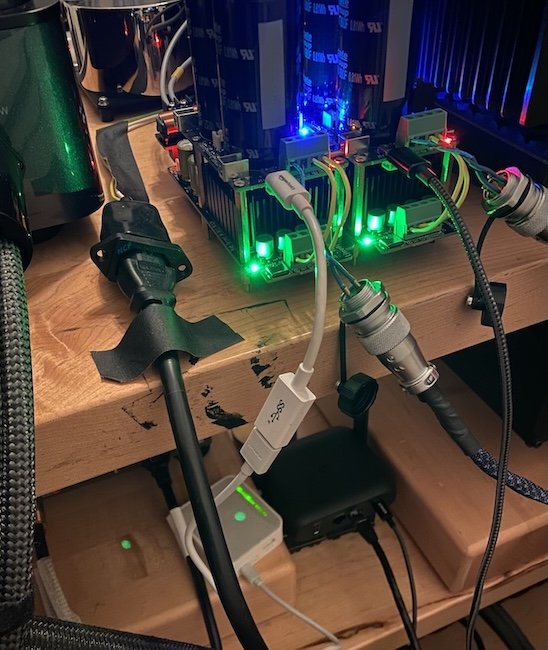
My network setup is a bit involved and has a separate routing domain for the Audio and home network. the music server connects to the audio router via two audiophile switches (one is a LHY sw10pro) located physically in different rooms...so it's a mess as you can see
I have been playing with WR902AC for couple of days now and I can confidently say that I am able to simplify my setup enormously which is what I always wanted to....I tried several battery packs (that I already have) but they don't seem to last more than 1.5 days or so. They do sound good but I have not compared it with the Anker that is suggested in this thread. I have several LPS, mostly DIY to power by JCAT USB and Net card for my music server and the best I have found so far is IanCanada linearpi pro with Ucconditoner on top and that did it for me. I think that's the best sound I am getting from WR902AC. I am yet to mod to get to directly 3.3v.....
However, I also had Roon complaining about loading issues on some larger files. In the past 100mbps has never sounded better than 1Gbps in my setup. When I had etherregen, the 100mbps A port did not sound any better than the B side ports in spite of what uptone claims. Many in other computer audio forums also found the same issue with etherregen. My modded Buffalo switch when I downgrade/forced the link to 100mbps did not sound any better than when auto-neogiated to 1G link. This might be due to latency but who knows...
I also ordered the Be3600 few days back. This is a bigger beast than the WR902AC and have been powering it the same way (using IanCanada) as WR902AC....I am still playing with both of them (as they are still burning in....) but in my setup, the BE3600 sounds better with more depth, cleaner and with slightly more air to it. This is all preliminary reports, so take it for what it's worth. In the end, if I end up liking the Be3600 I will venture into modding it with 3.3v, etc if that's a possibility. Will report back when I get more time with it..
Also, I have found that footers make a good bit differences, so experiment with it as well....
Yes I have one of your JS-4’s as well… I may try next… but it’s working great powering my router and access point, so I don’t really want to move itKeetakawee is correct about this. The WR802N is the better device for this application.
Also, we've yet to test a portable battery pack that puts out really clean 5V. It's not as if ANY battery maker is going to put a filter network and a pair of LT3045 linear regs on the output--to produce quiet power for a phone?
There are better DIY options for getting clean, low impedance 5V or 3.3V. (or some JS-4 owner here could use the 3.3V setting of one of its outputs
And okay, who is going to be the first to run a low-phase-noise clock into their TP-Link Wifi point?
Turns out that it was a stupid user problem. The last steps for the TL-WR1520X deviate from what Keith had posted. Once I found the online instructions for setting up client mode, I realized that I had gotten it just a few more steps away from functioning in client mode. Listening will have to wait for another night.You had better luck than I, but it might be because I opted for the travel router that supports gigabit. The instructions Keith provided can’t be performed exactly as described. Frustrating as heck so I will likely bail on it.
Forgive my off-topic reply…Yet to set the record straight with due respect:However, I also had Roon complaining about loading issues on some larger files. In the past 100mbps has never sounded better than 1Gbps in my setup. When I had etherregen, the 100mbps A port did not sound any better than the B side ports in spite of what uptone claims. Many in other computer audio forums also found the same issue with etherregen. My modded Buffalo switch when I downgrade/forced the link to 100mbps did not sound any better than when auto-neogiated to 1G link. This might be due to latency but who knows..
You seem to have a few things backwards as the ‘A’ side of EtherREGEN had four Gigabit-capable RJ45 ports (plus a Gigabit-only SFP port), while the lone ‘B’ side RJ45–the one across our proprietary active-differential isolation and reclocking “moat”—was limited to 100Mbps.
And for the vast majority of the 3,500+ owners that ‘B’ port absolutely sounds best for connection of the audio endpoint. But that had nothing to do with the 100Mbps limitation!
But yes, for some Roon users where their endpoint is also the Roon Core Server, the 100Mbps limitation of the ‘B’ port can sometimes present file loading issues—especially if those files are being fetched from an upstream NAS, or when Roon is updating its metadata.
Also, for those whose endpoints have an SFP cage input it was necessary to “turn around” our switch and run B>A—with some small attendant compromise.
Both the above limitations will go away with EtherREGEN Gen2 in the first half of this coming year as, among a host of other technical advancements, the ‘B’ side will have both a Gigabit-capable RJ45 port and an SFP port (driven directly off our ultra-low-jitter flip-flops ).
Now back to this fun discussion of DIYing with this portable WiFi extender.
Forgive my off-topic reply…Yet to set the record straight with due respect:
You seem to have a few things backwards as the ‘A’ side of EtherREGEN had four Gigabit-capable RJ45 ports (plus a Gigabit-only SFP port), while the lone ‘B’ side RJ45–the one across our proprietary active-differential isolation and reclocking “moat”—was limited to 100Mbps.
And for the vast majority of the 3,500+ owners that ‘B’ port absolutely sounds best for connection of the audio endpoint. But that had nothing to do with the 100Mbps limitation!
ER is long gone and hence I might have gotten the name backwards (sorry about that) but regardless, my point was 100mbps did not sound as good as 1G "in my setup" and many I know claimed similar things. That doesn't mean others will not have a better outcome using the product the way it was designed.
Last edited:
Keetakawee is correct about this. The WR802N is the better device for this application.
Also, we've yet to test a portable battery pack that puts out really clean 5V. It's not as if ANY battery maker is going to put a filter network and a pair of LT3045 linear regs on the output--to produce quiet power for a phone?
There are better DIY options for getting clean, low impedance 5V or 3.3V. (or some JS-4 owner here could use the 3.3V setting of one of its outputs
And okay, who is going to be the first to run a low-phase-noise clock into their TP-Link Wifi point?
Thank you for confirmation. Making streaming improvement affordable for everyone is always my goal. I'm glad to see manufacturers supporting community to make better streaming more affordable.
Regards,
Keetakawee

I did the same & it works . Ip address to try 192.168.0.1Success. Taking your suggestion before dragging my old windows laptop out I tried again on my iPhone. I omitted http:// from the address when I entered it in Safari and it worked. It was a PITA using my phone for this kind of thing but I completed the setup process with no apparent problem. Unfortunately my Anker battery pack was delayed and won't be delivered until this afternoon so no SQ results yet.
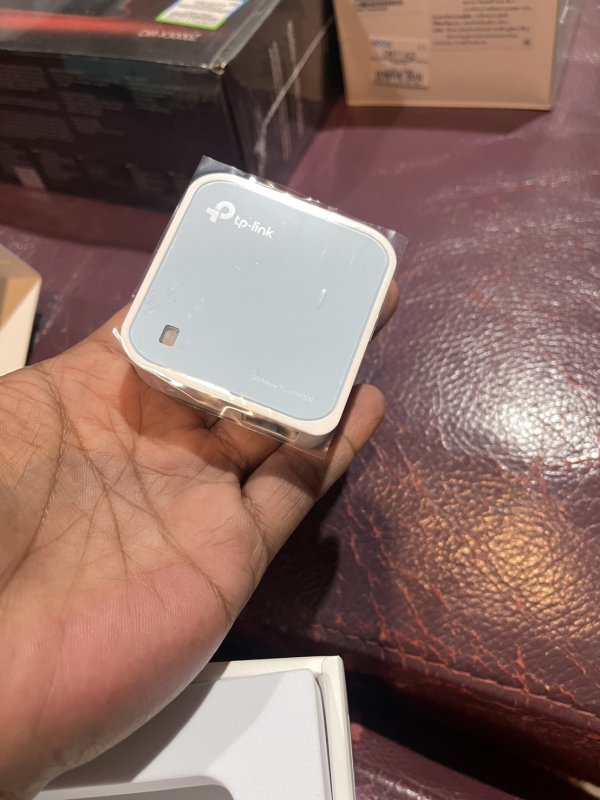
New TL-WR802N has arrived. I'm going to mod with my friend tonight. Since I have clock with matching frequency on both switch and wifi from my current router project, I hope they can work right away. Stay tuned.
Regards,
Keetakawee
Regards,
Keetakawee
Attachments
Last edited:
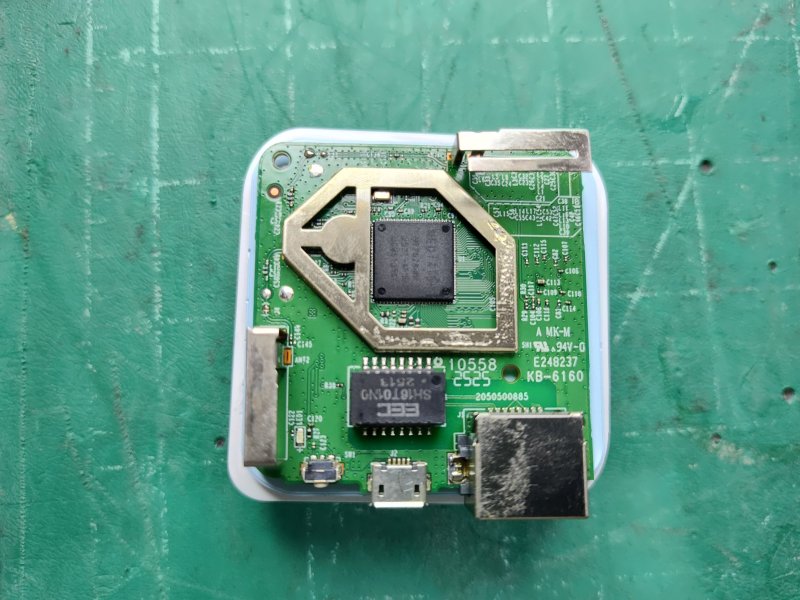
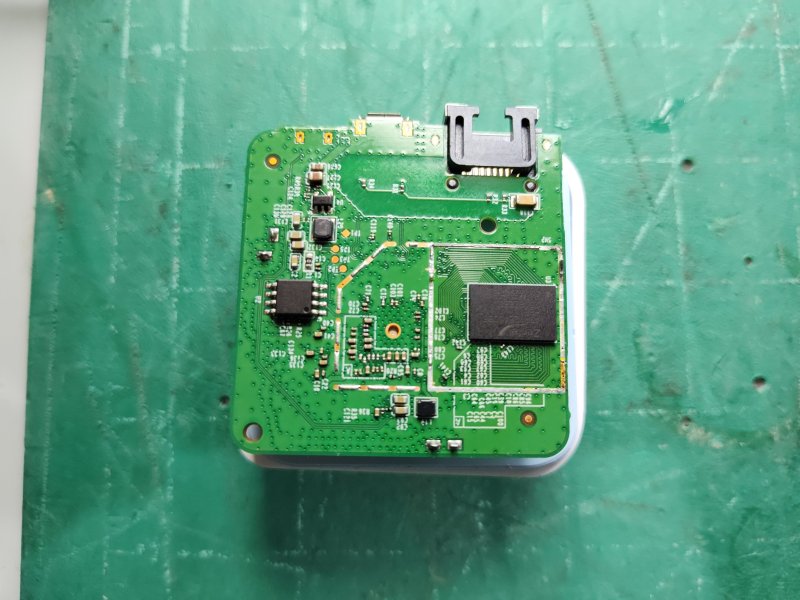
Opened TL-WR802N now. To my surprise, I expected clock module under metal bracket on another side but there's no clock inside. TL-WR702N had one before. There's only one clock around mediatek chip but it's on edge below metal bracket.
Well, modding clock is possible with some DIY skill. At least I won't have to put up to 400 degree Celsius to open a sealed bracket again. Will tinker around and report again after making sure it's still working later.
Regards,
Keetakawee
Well, modding clock is possible with some DIY skill. At least I won't have to put up to 400 degree Celsius to open a sealed bracket again. Will tinker around and report again after making sure it's still working later.
Regards,
Keetakawee
Attachments
Last edited:
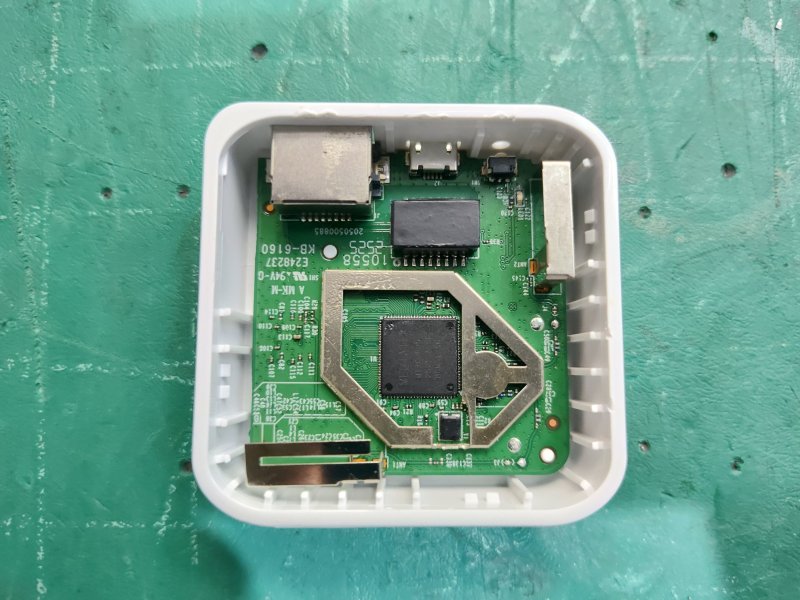
Finished modding TP-Link WR802N nano router. For now I'll start testing with.
-Upgrading clock with higher precision and lower phase noise
-Damp clock and output transformer module with vibration control and EMI/RFI protection
Once I get home, I'll test with stock unit and compare how hardware mods will affect this.
Regards,
Keetakawee
-Upgrading clock with higher precision and lower phase noise
-Damp clock and output transformer module with vibration control and EMI/RFI protection
Once I get home, I'll test with stock unit and compare how hardware mods will affect this.
Regards,
Keetakawee
Attachments
Similar threads

- Replies
- 7
- Views
- 585
- Replies
- 11
- Views
- 1K
- Replies
- 55
- Views
- 19K


- Replies
- 131
- Views
- 22K


 | Steve Williams Site Founder | Site Owner | Administrator |  | Ron Resnick Site Owner | Administrator |  | Julian (The Fixer) Website Build | Marketing Managersing |