





REVIEW: The best yet most affordable network switch (TPLink WR902AC)

just a note on folks saying that the Tplink is not accessible via tplinkwifi.net when in client mode. You can't access it in client mode. In client mode it gets it's own IP address from the wifi host. So if your network is say 10.0.1.x/24 (which I have), then the tplink would get an ip from that network in client mode. The url tplinkwifi.net is hardcoded to 192.168.0.1 which is only accessible in router mode. To get to Tplink in client mode, look at the IP address assigned by your wifi host/router and then directly access it from the browser using the same IP address.
I agree with all the above, but there is a slight wrinkle. When I call up the static address from the Google browser in my Samsung Android phone, the WR902 refuses to connect (403 Forbidden). This is unlike my five other TP-Link devices. I am only able to access the assigned IP via Chrome, in my phone or PC, or PC/Edge.

All my TP-Link device are operable using the Tether app, but the WR902 does not show at all in the app. This is not just down to client mode, because I run the RE450 in client mode.
 
Last edited:
That's interesting. Based on the recommendation of a previous poster I ordered a USB cable also from Amazon. I don't think it's beefier but it's supposed to be copper with gold(!) plated contacts. It's being delivered tomorrow and I'll report back.
My Ugreen 300w Nexode GAN USB-C power supply came with a shielded USB-C cable and it's been the best of all I have on-hand right now. Not sure that's a helpful data point.

I have been experimenting with the different power modes of the TL-WR3602BE. I started with ECO and the unit still ran warm and latency in Roon user interface was acceptable, but higher than normal. "Balanced" mode sees the unit running slightly cooler, UI latency is reduced to nearly hard-wired levels, and the sound has further opened up, yet also with added body and speed. Subtle SQ improvements.... letting it play to see if they are stable, or transitory.

EDIT: steady state CPU usage during streaming, as a % of total, has also dropped from ~30% to ~12% when I moved from ECO to Balanced.
 
Last edited:
My Ugreen 300w Nexode GAN USB-C power supply came with a shielded USB-C cable and it's been the best of all I have on-hand right now. Not sure that's a helpful data point.

I have been experimenting with the different power modes of the TL-WR3602BE. I started with ECO and the unit still ran warm and latency in Roon user interface was acceptable, but higher than normal. "Balanced" mode sees the unit running slightly cooler, UI latency is reduced to nearly hard-wired levels, and the sound has further opened up, yet also with added body and speed. Subtle SQ improvements.... letting it play to see if they are stable, or transitory.
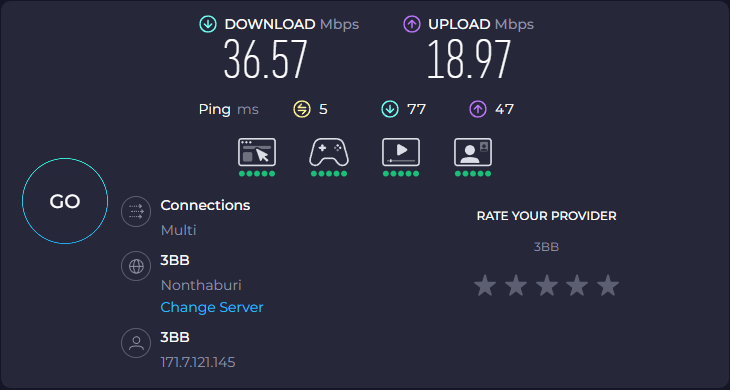
Super helpful, thank you. I set up the WR3602BE last night and on ECO mode had significant lag w/ Roon. I was surprised on 2.4GHz the overall speed when directly cabled to my laptop on Speedtest.net was not any better than my WR902AC (37.91Mbps vs 30.62MBps; in comparison the laptop's wifi was 253.35MBps). Initial sound impression was mixed but I was wondering about my USBA->C cable, so maybe I'll try the Ugreen instead!
 
Super helpful, thank you. I set up the WR3602BE last night and on ECO mode had significant lag w/ Roon. I was surprised on 2.4GHz the overall speed when directly cabled to my laptop on Speedtest.net was not any better than my WR902AC (37.91Mbps vs 30.62MBps; in comparison the laptop's wifi was 253.35MBps). Initial sound impression was mixed but I was wondering about my USBA->C cable, so maybe I'll try the Ugreen instead!
I'm also on 5Ghz, I should note. My Netgear ORBI RBK753 mesh has been terrible for any streaming on the 2.4 side of the mesh network since a firmware update in 2023. So, this peculiarity of my WiFi forces me to use 5Ghz as the 2.4 band is just awful. Mayhaps Netgear over-optimized 2.4 for IoT? Who knows. I can't rollback, so I've been stuck with it.

I highly doubt I am achieving the same levels of SQ as folks on the 902 hardware. Just doing the best I can.
 
  • Like
Reactions: tony22
The WR902AC setup EASILY takes the throne in the microdetails department. In the opening minute for Diana Krall's Live in Paris "A Case Of You" (Qobuz) it was as a microphone is now picking up every pedal rub, creak of her seat, cough from the audience many rows away, and the nuances in her exhalations behind decaying notes. I never knew there was a subtle knocking during the opening of "The Look Of Love" (from Diana's hand or foot tapping?).
FWIW, I listened to both tracks with my iPhone 12 mini running iOS 26.2 with Spotify Lossless and wired Apple HPs.
The iPhone is connected via wifi to my ISP router and set to a manual IP address.
With this set-up I can easily pick up these details and nuances in the microdetails department as well.
 
  • Like
Reactions: NaimYourTubes
Naim, do you have a settings list yet for the 3602?
I've not compiled a full list, but can share what I have changed and not changed in the standard TP Link UI so far:

* I opted out of the data sharing
* Network -> LAN -> Flow Controller (RX & TX = Enabled)
* Network -> DHCP Server = Auto
* USB -> Storage Device -> Disabled all radio buttons (including Secure Sharing & Media Sharing)
* LED Control -> LED Status = OFF
* Action Switch -> LED On/Off
* ECO Mode -> Balance Mode
* Operation mode -> AP/RE/Client Mode

I'm finding that the 2.5gbps LAN/WAN port sounds slightly better than the 1gbps. BUT, my Roon Nucleus Titan has a native 2.5gbps NIC, so its preference for that may be unique compared to a natively 1gbps NIC.
 
  • Like
Reactions: tony22 and matthias
I'm also on 5Ghz, I should note. My Netgear ORBI RBK753 mesh has been terrible for any streaming on the 2.4 side of the mesh network since a firmware update in 2023. So, this peculiarity of my WiFi forces me to use 5Ghz as the 2.4 band is just awful. Mayhaps Netgear over-optimized 2.4 for IoT? Who knows. I can't rollback, so I've been stuck with it.

I am on even older rbr50. I agree their performance is horrible and I am only using it as an AP. I think it slowly degraded with every firmware updates. Looking at your post it makes me wonder if they do it on purpose to force customer to upgrade to their latest model...but come next yr, I am thinking of upgrading to a Tplink Deco mess :)
 
  • Like
Reactions: NaimYourTubes
I am on even older rbr50. I agree their performance is horrible and I am only using it as an AP. I think it slowly degraded with every firmware updates. Looking at your post it makes me wonder if they do it on purpose to force customer to upgrade to their latest model...but come next yr, I am thinking of upgrading to a Tplink Deco mess :)
YES!!! Every firmware I allowed to be installed resulted in either an additional performance degradation or a reduction in stability. Sometimes both.

I have the Firewalla Gold Plus and am very pleased with it. I will likely move to their AP-7 access points (in a mesh configuration) in the near future.

Netgear also disabled the link aggregation feature when in AP mode, where I -COULD- LA two 1gbps ports With my Firewalla Gold Plus. But, as of the same firmware update in 2023 (IIRC), they disabled this functionality. BUT, if you want to use their main base station as a router, then you can link aggregate all day long.
 
Today I tested client mode with OpenWRT firmware using 3dBm which transmit power at 1mW only. TP-Link's lowest setting is 10dBm with 10mW transmit power so OpenWRT will make the most quiet and low noise WiFi.

1766364927308.png

I wonder if this speed is enough for most streaming needs in this market. Should I raise from 3dBm to 6-8dBm for more speed?
 
I added some instructions to setup OpenWRT as client mode which is far better than using client mode on original firmware in this post below. Please keep in mind it's more complexed to setup but its improvement is enough for me to understand why some people love client mode.

 
  • Like
Reactions: tony22
My Tp link+ Anker 337 powerbank has been running in my system less than 2 hours.
To be Frank it was really bad at start but now after a slight warm up I begin to understand why this is popular.
Thank you @keithc
 
My Tp link+ Anker 337 powerbank has been running in my system less than 2 hours.
To be Frank it was really bad at start but now after a slight warm up I begin to understand why this is popular.
Thank you @keithc
What part of your network path did you bypass?
 
I added some instructions to setup OpenWRT as client mode which is far better than using client mode on original firmware in this post below. Please keep in mind it's more complexed to setup but its improvement is enough for me to understand why some people love client mode.

Have you decided whether you still prefer access point mode?
 
  • Like
Reactions: tony22
Super helpful, thank you. I set up the WR3602BE last night and on ECO mode had significant lag w/ Roon. I was surprised on 2.4GHz the overall speed when directly cabled to my laptop on Speedtest.net was not any better than my WR902AC (37.91Mbps vs 30.62MBps; in comparison the laptop's wifi was 253.35MBps). Initial sound impression was mixed but I was wondering about my USBA->C cable, so maybe I'll try the Ugreen instead!
Maybe if in some setups WR902AC and WR1502X setups were experiencing constant drops, it can obviously affect both reliability and perceived sound quality. I would think in dedicated setups, the 902 shines when it’s properly configured — client mode, low TX power, LEDs off, clean power, and minimal network load.

Something to consider is the BE3602 sounding “better cold” in a system could reflect differences in network stability and conditions rather than an inherent advantage in SQ. After following the last few days of experiments, one thing is clear: the WR902AC and TL-WR3602BE behave very differently, due to both hardware and settings. The 902 is almost foolproof: 2.4 GHz, 20 MHz, modest transmit power, rather simple firmware settings. It sounds calm and consistent because there’s little to go wrong. The 3602 has stronger antennas, a higher-powered radio, and a more capable CPU, which can be great if tuned, but these defaults can overwork it. It’s far more capable, but that also means settings matter a lot more.

In some setups in ECO mode with 2.4 GHz and 20 MHz it can sound smoother than the 902, but Balanced or ‘performance’ modes can introduce jitter or RF energy that harms SQ. Again, it seems upstream Wi‑Fi also plays a role: even with a good bridge, a noisy or unstable parent network could reduce performance. I know some will not agree but IME If you leave the 3602 on 5 GHz with wide channels or performance power modes, you’re no longer testing the same concept at all.

Takeaway: if the 902 works well almost by accident, the 3602 could outperform it if deliberately slowed and simplified (stop it from being a fast, adaptive, whole-home router, and let it be just a quiet RF-to-Ethernet bridge :) )
 
Last edited:
  • Like
Reactions: keithc and ticktock
Have you decided whether you still prefer access point mode?

I still prefer access point mode more. But client mode on OpenWRT is at least more preferable than no treatment in my system now.

I already have good implementation of network switch + power supply + cables to work with audiophile access point.

For TP-Link with tweaked access point mode in OpenWRT, it could be a great value investment for any system.

Regards,
Keetakawee
 
  • Like
Reactions: tony22
I thought OpenWRT wasn’t available for the 3602?
 
I thought OpenWRT wasn’t available for the 3602?

He uses 3602? I hope it'll be available in future then. I checked WR802N and WR902AC and both can install OpenWRT. It's very good when you use 1mW transmit power to reduce WiFi interference to bare minimum on both access point and client mode.

Regards,
Keetakawee
 

About us

  • What’s Best Forum is THE forum for high end audio, product reviews, advice and sharing experiences on the best of everything else. This is THE place where audiophiles and audio companies discuss vintage, contemporary and new audio products, music servers, music streamers, computer audio, digital-to-analog converters, turntables, phono stages, cartridges, reel-to-reel tape machines, speakers, headphones and tube and solid-state amplification. Founded in 2010 What’s Best Forum invites intelligent and courteous people of all interests and backgrounds to describe and discuss the best of everything. From beginners to life-long hobbyists to industry professionals, we enjoy learning about new things and meeting new people, and participating in spirited debates.

Quick Navigation

User Menu

Steve Williams
Site Founder | Site Owner | Administrator
Ron Resnick
Site Owner | Administrator
Julian (The Fixer)
Website Build | Marketing Managersing