REVIEW: The best yet most affordable network switch (TPLink WR902AC)

Awesome! Following in yours and @Devg's footsteps I have both the 802N and 3600BE incoming.
Thanks for paving the way.
I appreciate your very generous comment, but I hardly am paving the way....though I'm pleased to contribute a very tiny part to this effort. Excited to see where this takes us all! ☺️
 
  • Like
Reactions: keithc
interesting that keith said that some of his conversions have failed for unknown reasons.
i ran into that today, setting up a tplink/anker feed directly into my friend's taiko extreme.

i did the setup twice (paper clips are our friends), both times getting the tplink to client status (as seen by my ipscanner) but the ethernet link to the extreme was not working (for some reason) and i could not get the extreme to be discovered on the network even after a reboot or two. putting the same cable into his ethernet switch across the room worked every time as i went back and forth.

i have taken this tplink home with me and will see if i can get it working here with my video system, at the input to my nvidia shield pro (not going to mess with my working tplink!)

anyone have ideas on what could be the problem here?
 
interesting that keith said that some of his conversions have failed for unknown reasons.
i ran into that today, setting up a tplink/anker feed directly into my friend's taiko extreme.

i did the setup twice (paper clips are our friends), both times getting the tplink to client status (as seen by my ipscanner) but the ethernet link to the extreme was not working (for some reason) and i could not get the extreme to be discovered on the network even after a reboot or two. putting the same cable into his ethernet switch across the room worked every time as i went back and forth.

i have taken this tplink home with me and will see if i can get it working here with my video system, at the input to my nvidia shield pro (not going to mess with my working tplink!)

anyone have ideas on what could be the problem here?
An off the wall thought; as I recall you're running through your Taiko router and switch to your Extreme. Ray-dude is doing the same to his Olympus. Do we know of anyone who is running the tplink directly to an Extreme or Olympus? I'm thinking it may have something to do with the 100 Mbps output of the tplink. I have absolutely no technical reason to back up my theory.
 
  • Like
Reactions: NaimYourTubes
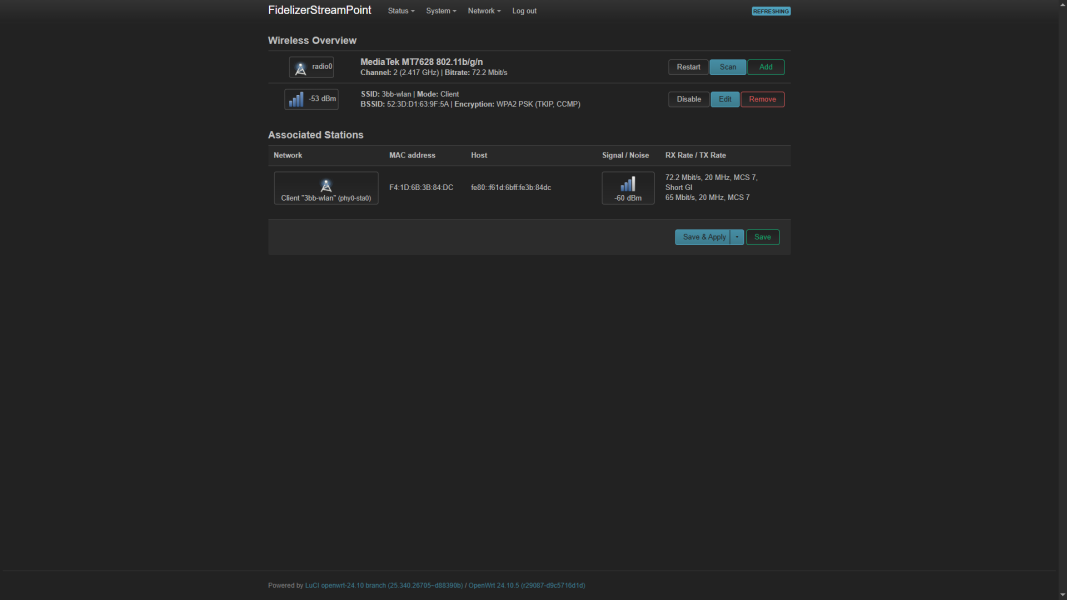
1766194929146.png

Posted from OpenWRT's client mode. Took a while to get this done right. It seems to sound better than Client mode from TP-Link based on my work PC's playback system. Will test on reference audio system soon after figuring out the optimal transmission power. :)

Regards,
Keetakawee
 
Before you read further, just a few words. Generally I find it difficult to play around too much with swaps of things. I do it as best as I can, but I tend to go with initial findings for better or worse, so read the following in somewhat of this context, i.e., with a small pinch of salt.

I got the little toy (WR902AC) as well as two Anker battery packs (they slightly differ from the ones recommended in this thread, as Amazon Australia seems to have slightly different Anker models, but they were roughly about the same), so that if one runs out, I can just swap it for the other Anker that’s been fully charged and ready to go.

My system is a Roon server connected to the switch, and another Ethernet cable is connected from the switch to my streamer.

I got the little toy and configured it as recommended in this thread. Powered it with the Anker and removed the streamer Ethernet cable from the switch and plugged it into WR902AC. Yes, it made an improvement compared to the switch I was using, but not to the extent that people seem to be reporting—I think mainly/possibly due to the fact that I have worked reasonably hard to condition my power side of things and also have a grounding device on the switch ground plug.

On an arbitrary scale I would say one notch up in sound quality. I was expecting a little more, but no worries, an increase is an increase, and I have removed the switch in my streaming chain. I would generally say a cleaner and additional detail via the WR902AC.

I did not go back to my previous configuration to double-check things, as I was quite happy with the sound, so I left it as is.

I would say that generally power cables seem to make a bit of difference, so that got me thinking, what would happen if I replaced the USB->Micro power cable that came with the WR902AC. So, I attempted to get a slightly better one. I checked Amazon, I looked at a few, and I chose this UGREEN option, as it seemed to say it was made with copper and seemed to be protected with an aluminum screen. I was particularly interested as it was tinned copper. Not too expensive for 1.5FT. I have put the Amazon US link and not the Amazon Australia link (but it's the same cable).

Amazon.com: UGREEN Micro USB Cable, 1.5FT High Speed Fast Charging USB Cable, Nylon Braided Durable Android Phone Charger Cord, Compatible with Samsung Galaxy S7 S6 Note LG V10 Tablet PS4 MP3 : Electronics

I was playing a well-recorded and well-known-to-me track with the default USB power cable. I paused the track, swapped to the UGREEN from the Anker, and waited for WR902AC to boot up. Once all was done, I resumed play. The improved clarity and cleanness were quite noticeable, so it was well worth the $8 punt. I would say nearly another one notch further up in sound quality. YMMV.

I don’t at this stage plan to buy anything fancier; this was good enough and quite easy to try.

So, thanks everyone for all your contributions to this thread; it's most useful and helpful and resulted in improved sound quality.

Everyone, have a wonderful festive season.

P.S. As my router and WR902AC are in the same room, I don’t have any difficulties playing DXD files (24/364 ?) or DSD256 files even with 2.4Ghz.

 
View attachment 163332

Posted from OpenWRT's client mode. Took a while to get this done right. It seems to sound better than Client mode from TP-Link based on my work PC's playback system. Will test on reference audio system soon after figuring out the optimal transmission power. :)

Regards,
Keetakawee
OpenWRT has a long history with routers dating back to the early 2000s, and some of my favourite Linksys WiFi routers. It allows for a lot more functionality and configuration of networking hardware. I mention compliance because:

"Some TP-Link routers, particularly those sold in the United States, are locked down and cannot be used with OpenWrt due to compliance with new FCC regulations that require manufacturers to prevent devices from operating outside approved frequencies, modulation types, and power levels. This has led to some models being intentionally blocked from running third-party firmware, although the FCC does not officially ban such use."

TP-Link is not the only game in town when it comes to networking gear, so no doubt folks can explore other networking hardware options, in this pursuit. Some of OpenWRT's additional capabilities might come in handy for some.

"OpenWrt has maintained a strong focus on open-source principles, offering a writeable root file system, a package management system (opkg) with approximately 8,000 optional packages, and support for both command-line (ash shell) and web-based (LuCI) configuration. It provides extensive network configuration capabilities, including support for IPv4, IPv6, DNS, DHCP, routing, firewall, NAT, port forwarding, and WPA security. The project also supports advanced features like mesh networking, wireless repeater and access point functionality, and dynamic hardware driver configuration."

Its command-line interface via SSH would probably make testing various options easier, as it would be much faster and more streamlined than the web interface.
 
  • Like
Reactions: NaimYourTubes
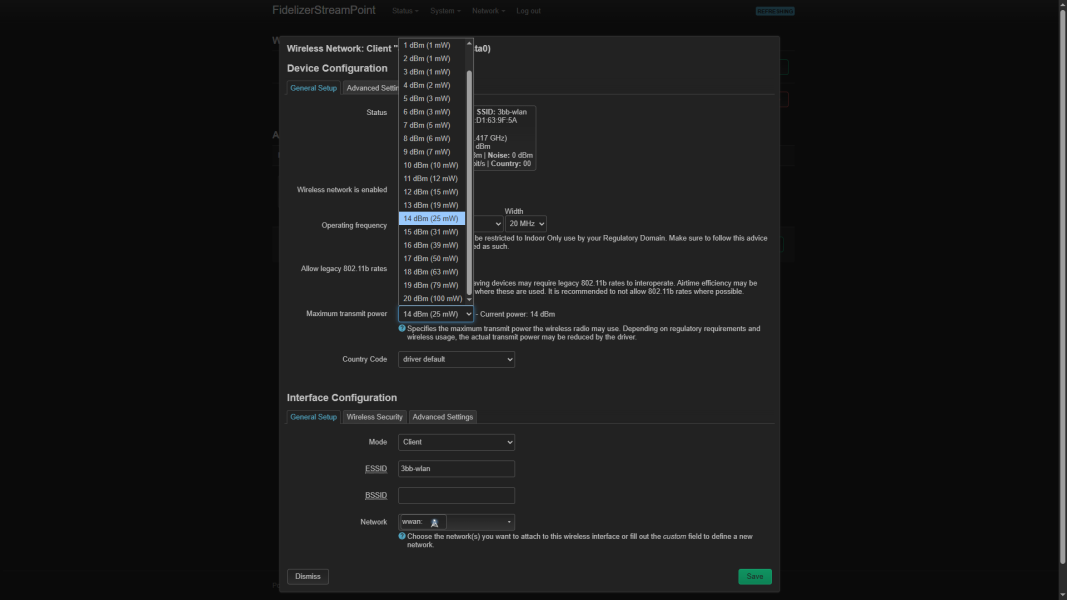
1766198129484.png

Testing client mode again on reference system with OpenWRT firmware proved to be unsuccessful. I thought about it and realized using low transmission power to send/receive WiFi signal as client mode will weaken dynamics significantly.

I changed back to default value and it sounds a lot fuller. Perhaps people who prefer details / clarity / transparency over full sound experience might like low transmission power. When data is involved, getting WiFi power as low as possible is not recommended.

I tested around different values and found 14db was quite okay TP-Link's factory firmware allows High (20) / Medium (15) / Low (10) so medium at 15db will be closer to this value. I didn't find it sounding right though. Kinda prefer 16db for more meaty sound or 12db for crisper sound.

I still don't like Client mode on my main system despite having optimal transmission power adjusted though. Maybe it's because I use Rockport speakers so changing to WiFi transmission doesn't bring full sound like wired network setup.

Also, changing to access point mode allows me to setup wifi strength to much lower values like 3-6db. Since I'll put this wifi router next to streamer in listening room and send control signal only, I can minimize interference from WiFi to much lower value.

Anyway, I highly recommend everyone to try OpenWRT firmware. This will allow you to bring the full potentials of TP-Link device. They don't offer much to tinker around like ASUS routers so using OpenWRT will help a lot.

Regards,
Keetakawee
 
interesting that keith said that some of his conversions have failed for unknown reasons.
i ran into that today, setting up a tplink/anker feed directly into my friend's taiko extreme.

i did the setup twice (paper clips are our friends), both times getting the tplink to client status (as seen by my ipscanner) but the ethernet link to the extreme was not working (for some reason) and i could not get the extreme to be discovered on the network even after a reboot or two. putting the same cable into his ethernet switch across the room worked every time as i went back and forth.

i have taken this tplink home with me and will see if i can get it working here with my video system, at the input to my nvidia shield pro (not going to mess with my working tplink!)

anyone have ideas on what could be the problem here?

Just to clarify if you plug the TPLink (after setting up through client step) say to a computer's LAN you can get internet access?

My issues were getting TPLinkwifi.net to come up. Once that comes up the only other time I run into issues is when I set up the client mode and it has to reboot; sometimes it fails at that point. But all of mine have eventually recovered after multiple paperclips.
 

About us

  • What’s Best Forum is THE forum for high end audio, product reviews, advice and sharing experiences on the best of everything else. This is THE place where audiophiles and audio companies discuss vintage, contemporary and new audio products, music servers, music streamers, computer audio, digital-to-analog converters, turntables, phono stages, cartridges, reel-to-reel tape machines, speakers, headphones and tube and solid-state amplification. Founded in 2010 What’s Best Forum invites intelligent and courteous people of all interests and backgrounds to describe and discuss the best of everything. From beginners to life-long hobbyists to industry professionals, we enjoy learning about new things and meeting new people, and participating in spirited debates.

Quick Navigation

User Menu

Steve Williams
Site Founder | Site Owner | Administrator
Ron Resnick
Site Owner | Administrator
Julian (The Fixer)
Website Build | Marketing Managersing