





REVIEW: The best yet most affordable network switch (TPLink WR902AC)

Following up from my earlier post above. I was listening to the system, and over the course of a couple of hours, I felt that the sound was deteriorating. I initially put it down to the newness of the USB power cable needing bedding in (which I’m sure it needs), so I turned the system off. (It’s 9pm here in Aus).

I said I’ll charge the first power bank (as it had reached 40% by now) and just place the fully charged 2nd unit on the rack for tomorrow’s listening. Obviously, the scenario must have been mulled at the back of my mind without me realizing, and after 15 minutes, I had a light bulb moment. I said, "I wonder if it’s the power bank."

So back on went the system, and I played a very nicely recorded duet track with the 1st power bank (40% charge left), then a quick swap to the 2nd power bank (100% charge left). From my finding I can say that based on an Anker (20,000 mAh), the fully charged unit produced a far richer, natural, and very engaging sound. The 40% charged unit was getting slightly difficult to listen to, and I was not getting the same musical satisfaction.

So, my feeling is based on a “finger in the air” finding: either recharge the power bank once it has reached 50% (based on a 20,000 mAh unit) or swap for a fully charged second unit.

Now there are higher-capacity power bank models available; if someone has got one, kindly report back on your finding.

This confirms what @keithc mentioned about the higher capacity model giving better sound, based on my limited testing.
I would need the exact battery cell data and to understand their regulation circuit to know with certainty, but it wouldn't shock me if the bank has a simpler boost/buck regulation circuit, where when it moves into the boost phase you're trading current to maintain voltage. I suspect the bank may be entering the boost phase of the discharge curve at the ~40% mark. Wild guess though. Pure conjecture.

I found a very low ripple UGREEN 300w USC-C power supply with a 3-prong cord (UGreen Nexode 300w GAN 5 port desktop charger) that sounds radically better than the supplied power supply right out of the box. I have subsequently used some 75 Mixture Fair-Rite ferrties on both the AC input and the shielded solid core DC/USB-C charging cable. Two turns on the AC side and 4 or 5 turns on the USB-C cable. Each bringing increases in lushness, depth, clarity, space, tonal density, and focus.

Lastly, I used a 250VA Topaz Ultra Isolator (.0005pf) iso transformer to power the UGreen, resulting in more of the same improvements seen above (and so it doesn't pollute my balanced power feeding the rest of my system).

Even in ECO mode, the TP Link TL-WR3602BE runs warm. So some additional feet to elevate and control vibration have improved that situation markedly.
 
  • Like
Reactions: oldmustang
I meant to mention that I set up the WR902 using the stock power supply, but for the kitchen audio system I am powering it from the USB outlet of a Topping P50 LPS, which also powers the iFi DAC.

With both USB outlets working, power output drops from 1A to 0.8A. So to confirm what others have said, you don't need the 2A provided by the stock SMPS in Client Mode. I don't intend to hassle with a battery supply in this system, which is just for background listening, but I do hear improved clarity from the WR902 versus the RE200.
 
I finally got around to testing how streaming 4k Dolby Atmos/Vision via Fandango into my Nvidia Shield Pro would fare with the new setup.
I was almost certain things would not work as usual, but….:eek:
Y’all should be happy to know so far no issues with buffering, dropouts, or any negative impact.
:)
 
I finally got around to testing how streaming 4k Dolby Atmos/Vision via Fandango into my Nvidia Shield Pro would fare with the new setup.
I was almost certain things would not work as usual, but….:eek:
Y’all should be happy to know so far no issues with buffering, dropouts, or any negative impact.
:)

Any improvements noted with shield pro?
 
I finally got around to testing how streaming 4k Dolby Atmos/Vision via Fandango into my Nvidia Shield Pro would fare with the new setup.
I was almost certain things would not work as usual, but….:eek:
Y’all should be happy to know so far no issues with buffering, dropouts, or any negative impact.
:)
The Shield Pro has onboard WiFi so I would think that would provide an “air gap”. Of course things are rarely that straightforward. Are you seeing and hearing an improvement when video streaming through the TP Link travel router?
 
just a note on folks saying that the Tplink is not accessible via tplinkwifi.net when in client mode. You can't access it in client mode. In client mode it gets it's own IP address from the wifi host. So if your network is say 10.0.1.x/24 (which I have), then the tplink would get an ip from that network in client mode. The url tplinkwifi.net is hardcoded to 192.168.0.1 which is only accessible in router mode. To get to Tplink in client mode, look at the IP address assigned by your wifi host/router and then directly access it from the browser using the same IP address.
 
Last edited:
I have a projector/screen in my sound room and haven’t had the opportunity to switch into ”HT mode” yet (turn off lighting, aspect ratio on screen, move a few room acoustic treatments, etc,) to evaluate any possible improvements.
I selected a movie in my Vudu library and hit play. No delays and no buffering for half hour.
I have never engaged WiFi on the Shield (never entered password) so there is no way that any internal WiFi is engaged to contribute to this success.
 
Last edited:
For those who are interested in trying OpenWRT, I've made a new thread to provide instructions for TP-Link WR802N / WR902AC unit here.


With OpenWRT, I can reduce transmit power further from 10dBm (10mW) down to 3dBm (1mW) which makes a very quiet access point. :)

Regards,
Keetakawee
 
For those who are interested in trying OpenWRT, I've made a new thread to provide instructions for TP-Link WR802N / WR902AC unit here.


With OpenWRT, I can reduce transmit power further from 10dBm (10mW) down to 3dBm (1mW) which makes a very quiet access point. :)

Regards,

I've been running the TP Link 902 for about two hours. It's a step up in smoothness, clarity and seems to definitely have a lower noise floor. No drops on 192 or DSD 128 (DOP). I've been running my Aardvark Link from the TP Link to my server so far. Tomorrow I'll substitute a Blue Jeans Cat 6A cable for the link and report back. We're leaving for Christmas week Monday. When I return I should have the QSA stuff I ordered so I'll try one of their Ethernet cables as well. At this point the sound I have now is the best I've heard from this system.
I swapped the Link for a Blue Jeans Cat 6A cable and it was a big step back. Music was shallow and a bit bright, this on a full battery charge. I noticed the internet LED on the TP was blinking after the swap. I swapped the Link back and the good sound returned but the internet light is still blinking. I disconnected the TP from the battery for a couple of minutes and plugged it back in but the light is still blinking. Any ideas?
 
  • Like
Reactions: NaimYourTubes
just a note on folks saying that the Tplink is not accessible via tplinkwifi.net when in client mode. You can't access it in client mode. In client mode it gets it's own IP address from the wifi host. So if your network is say 10.0.1.x/24 (which I have), then the tplink would get an ip from that network in client mode. The url tplinkwifi.net is hardcoded to 192.168.0.1 which can only be accessible in router mode. To get to Tplink in client mode, look at the IP address assigned by your wifi host/router and then directly access it from the browser using the same IP address.
Thank you! My BE3600 login screen came up when I went to the IP that is assigned to my music server (Nucleus Titan). Nevertheless, it WORKS! Much appreciated.
 
  • Like
Reactions: Devg
I swapped the Link for a Blue Jeans Cat 6A cable and it was a big step back. Music was shallow and a bit bright, this on a full battery charge. I noticed the internet LED on the TP was blinking after the swap. I swapped the Link back and the good sound returned but the internet light is still blinking. I disconnected the TP from the battery for a couple of minutes and plugged it back in but the light is still blinking. Any ideas?

Try hard reset and setup again first.

Regards,
Keetakawee
 
Ok,
I have one TP-Link 902ac hanging off of a port on the router. It is in AP mode, using battery power - antek 313 (for now)and the stock ethernet cable. I have turned off the LeDs and local storage of logs and other mentioned tweaks.

The goal being: keep the server off of the busy subnet, place it onto a quieter broadcast domain (this was impactful for the wired network).

Well, things sound very very good with a pair of Anker 313 batteries. I have re-configured the client mode router to partner with the AP instead of my general use wifi network on a music-equipment only subnet.

Next up, to test:
1. Does the ethernet cable between the TP-Link 902AC and router (in AP duty) impact SQ?
2. Does power source of the AP matter for SQ? would a decent lps be sufficient? (An smps would introduce other noise for surrounding devices, so I do not intend to try an smps here).

Initially, the sound was a bit thin and faint. I worried using two of them in this way had deteriorated the sound quality or that the stock flat ethernet cable had negatively influenced sound quality. Neither were true! After a few hours or so the sound quality had improved beyond what the single 902AC was capable of.

Oh and for context : my router, and switch are Sean Jacobs DC4 powerd, my JCat Net XE Evo and Master Ocxo are JS-4 powered. So, premium power throughout my network stack and this experiment has been very impactful in a good way.

Using Roon RAAT - no performance issues or dropouts streaming up to 192k (my dac doesnt do dsd).
 
Try hard reset and setup again first.

Regards,
Keetakawee
I really don't want to do that unless I have to. Why would swapping ethernet cables cause the light to keep flashing? Could it change the settings?
 
I really don't want to do that unless I have to. Why would swapping ethernet cables cause the light to keep flashing? Could it change the settings?

I'm not sure if it's related to ethernet cable. But Resetting it and setup again shouldn't be too hard on stock firmware. It's not like you're running OpenWRT with custom configuration for complexed network setup. Make sure to backup configuration when you're done too.
 
I swapped the Link for a Blue Jeans Cat 6A cable and it was a big step back. Music was shallow and a bit bright, this on a full battery charge. I noticed the internet LED on the TP was blinking after the swap. I swapped the Link back and the good sound returned but the internet light is still blinking. I disconnected the TP from the battery for a couple of minutes and plugged it back in but the light is still blinking. Any ideas?

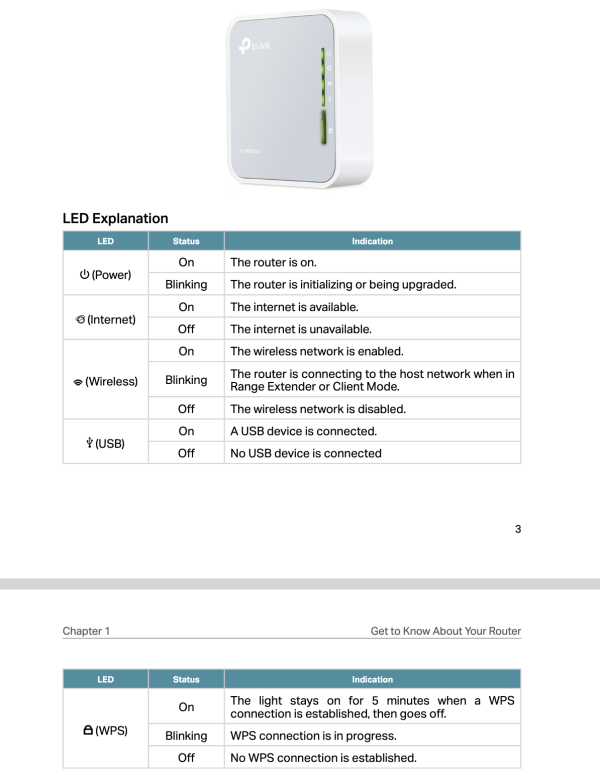
In client mode, you should only have power and wifi led turned on (mine is solid green), unless you have turned the led functions off. There is no "blinking" function on the internet LED. Are you sure it's the internet led that is blinking ?


Screenshot 2025-12-20 at 4.37.04 PM.png
 
i picked up a 1502x today and set it up in a roughly similar way.
i have it running in my system now and will try to do some SQ comparisons to the 902 tomorrow.

setup procedures are not identical but seem to have succeeded. a new setting is that the wifi power can be set to low/med/high and i'm running it in low

the 1502 supports wifi 6 and 1gb ethernet while the 902 supports the wifi 5 standard and 100mb ethernet.
 
Well, I have some interesting observations

1. The USB power cable matters significantly in my setup. I bought some beefier USB-C (240w fast charging cable) from Amazon. Ran it for a day and then I started to notice that the sound from Be3600 is not as good as when I started using it. Changed the cable back to stock and viola...

2. So as I mentioned before, I also have the 902ac for comparison but I am not using it at the moment as I have Roon drop outs but my goal was to compare it with the Be3600 at some point. Since all the Tplink products needs considerable amount of burn-in, I started to wonder if there is a way to burn the 902ac by running traffic through it instead of just leaving it powered on. This lead me to connect the 902ac to my NAS in client mode, just like I did it with the music server with Be3600. Well now I have a 100mbps link between the music server and NAS and the Roon drop outs came back BUT I hear quiet a bit of improvement this way, more analogous sound, if you will.

This might lead to a whole new rabbit hole but it's much more fun when I don't have to spend $$$ for experiementing as you would when it's a audiophile product (imagine you bought a $2000 power cord, you like it and now you need to buy 5 more to complete the loom :cool:).

3. Try different footers under the Tplink. I think it made a small but noticeable improvements in my setup as well.
 
In client mode, you should only have power and wifi led turned on (mine is solid green), unless you have turned the led functions off. There is no "blinking" function on the internet LED. Are you sure it's the internet led that is blinking ?


View attachment 163372
Positive. I reset the The TPLink and all three LEDs are on. When I swapped cables I didn't power the TPLink down. I will next time.
 
Well, I have some interesting observations

1. The USB power cable matters significantly in my setup. I bought some beefier USB-C (240w fast charging cable) from Amazon. Ran it for a day and then I started to notice that the sound from Be3600 is not as good as when I started using it. Changed the cable back to stock and viola...

2. So as I mentioned before, I also have the 902ac for comparison but I am not using it at the moment as I have Roon drop outs but my goal was to compare it with the Be3600 at some point. Since all the Tplink products needs considerable amount of burn-in, I started to wonder if there is a way to burn the 902ac by running traffic through it instead of just leaving it powered on. This lead me to connect the 902ac to my NAS in client mode, just like I did it with the music server with Be3600. Well now I have a 100mbps link between the music server and NAS and the Roon drop outs came back BUT I hear quiet a bit of improvement this way, more analogous sound, if you will.

This might lead to a whole new rabbit hole but it's much more fun when I don't have to spend $$$ for experiementing as you would when it's a audiophile product (imagine you bought a $2000 power cord, you like it and now you need to buy 5 more to complete the loom :cool:).

3. Try different footers under the Tplink. I think it made a small but noticeable improvements in my setup as well.
That's interesting. Based on the recommendation of a previous poster I ordered a USB cable also from Amazon. I don't think it's beefier but it's supposed to be copper with gold(!) plated contacts. It's being delivered tomorrow and I'll report back.
 

About us

  • What’s Best Forum is THE forum for high end audio, product reviews, advice and sharing experiences on the best of everything else. This is THE place where audiophiles and audio companies discuss vintage, contemporary and new audio products, music servers, music streamers, computer audio, digital-to-analog converters, turntables, phono stages, cartridges, reel-to-reel tape machines, speakers, headphones and tube and solid-state amplification. Founded in 2010 What’s Best Forum invites intelligent and courteous people of all interests and backgrounds to describe and discuss the best of everything. From beginners to life-long hobbyists to industry professionals, we enjoy learning about new things and meeting new people, and participating in spirited debates.

Quick Navigation

User Menu

Steve Williams
Site Founder | Site Owner | Administrator
Ron Resnick
Site Owner | Administrator
Julian (The Fixer)
Website Build | Marketing Managersing