REVIEW: The best yet most affordable network switch (TPLink WR902AC)

The TP-Link in question uses some of the most basic internals, and I have decades of experience with their networking products, along with so many other budget networking brands*, as both an IT/Networking professional and audiophile (48 years and counting for both)

* bridges, switches, routers, access points, transceivers, etc.

I am currently working with numerous individuals on Linux audio projects, including developers who use even more basic gear than TP-Link, which is to say Monoprice. The idea that one goes from Taiko to Network Acoustics to TP-Link beggars belief. Anything is possible, it's just that I find this wholly improbable and then the lengths and extent to tweak this solution are commendable, but to what end?

As for TAIKO, I take issue with them referring to their solution as a "SWITCH" when there is but one incoming and one outgoing set of Ethernet ports. Granted, there may very well be something like a Broadcom Tomahawk 6 switch chip in its shiny chassis, but from outward appearances to those familiar with networking gear, it physically resembles a switch.

Okay sure, however others have made the assertions.
 
Could you please share your software settings? That would be wonderful as I purchased 2 of these yesterday one for each system in my home. Merry Christmas.
PM'd you!
 
  • Love
Reactions: Republicoftexas69
...it's a purpose-driven solution, right? If it had six ports and five were turned off, would that be closer aligned with your definition of a switch?
By definition, a switch would have one incoming and a minimum of two outgoing; a bridge would be one in and one out. Purpose-built or not, from a pure networking perspective, calling it a bridge from the outset would have allayed a level of confusion. Anything can be made to work, simply a matter of terminology.
 
  • Like
Reactions: treitz3
I bought a TL-WR902AC in 2023 for my kitchen system. My house is a very tricky environment for wi-fi. The little travel router was not reliable due to its low power and I returned it. I bought another yesterday to try again, as my wi-fi system has improved.

By definition, a switch would have one incoming and a minimum of two outgoing; a bridge would be one in and one out. Purpose-built or not, from a pure networking perspective, calling it a bridge from the outset would have allayed a level of confusion. Anything can be made to work, simply a matter of terminology.
I agree. The TL-WR902AC can be used as a router, as a wi-fi access point (ethernet in, wi-fi out), or in client mode (wi-fi in, ethernet out). I would call it a router or a bridge. I would not call it a switch, as it has no capability for switching.
 
Indeed, this application is a WiFi bridge (client mode in the TPlink software) to insulate the downstream systems from common mode noise (at least that's Eric's hypothesis). The TP link is particularly low power, but more robust power to it definitely has an audible impact.

There is SQ gold to be found in these DIY hills, even with a basic implementation. Cheap and fun experiment to try
 
@keithc, I didn’t see a response to Patrice’s question about OpenWRT, but from what you did say it sounds like you’re using the stock operating environment? In any regards, please PM your settings. Thanks.
 
@keithc, I didn’t see a response to Patrice’s question about OpenWRT, but from what you did say it sounds like you’re using the stock operating environment? In any regards, please PM your settings. Thanks.

Hi:

Did not use OpenWRT but curious how others have found it. Will PM you the settings!

Keith
 
  • Like
Reactions: tony22
IIRC Eric (author on the German site) reported that with upgraded power he did not hear a difference with OpenWRT. I did not try it myself, I've been using the stock operating environment (with upgraded power)

The impact of the stock TP Link + stock operating environment with stock power was unambiguous here. I would recommend folks test the basic configuration, and based on what they hear, then make the decision if the work to tweak things up (power, cables, OpenWRT, etc) is worthwhile or not
 
  • Like
Reactions: audiobomber
IIRC Eric (author on the German site) reported that with upgraded power he did not hear a difference with OpenWRT. I did not try it myself, I've been using the stock operating environment (with upgraded power)

The impact of the stock TP Link + stock operating environment with stock power was unambiguous here. I would recommend folks test the basic configuration, and based on what they hear, then make the decision if the work to tweak things up (power, cables, OpenWRT, etc) is worthwhile or not
Have you tried the Anker battery pack KeithC recommends?
 
I tried the battery packs I had handy (this Anker https://www.amazon.com/dp/B07S829LBX and an older PowerPack battery pack that Amazon no longer lists). I also tried a 12V battery pack feeding a DXPWR dual regulator supply that down stepped to 5V.

The better power had better SQ for me, even with the standard 5V USB power input

With that in mind, I jumped right into bypassing the 5V -> 3.3V regulator inside the TP link and wiring 3.3V power input into my TP Link. I also used an IanCanada 3.3V battery supply and voltage conditioner:

Ian Canada LifePO4 Mini 3.3V
Ian Canada UcConditioner Pro 2025 3.3V with 450F UCs assembled

All in an external case

Basically $300=350 in parts (and a bunch of labor) for my power upgrade. Nice upgrade in SQ, but the raw TPLink with stock USB power from a power brick gets a huge chunk of that improvement without all the extra work/hassle of the power upgrades
 
  • Like
Reactions: MarkusBarkus
(I should qualify that I'm basically following the recipe that Eric and others put together on the German site...no claim to any discovery or innovation on my part, just catching up with the good work that Eric and that community has already done...happy to share experiences with others considering the same path, but all kudos to them)
 
(I should qualify that I'm basically following the recipe that Eric and others put together on the German site...no claim to any discovery or innovation on my part, just catching up with the good work that Eric and that community has already done...happy to share experiences with others considering the same path, but all kudos to them)
I have the TPLink and Anker battery pack on order. As I understand it the TPLink is 100MBS. Does your setup work with your Olympus which I understand requires 1 GB?
 
I am feeding the TPLink into my Taiko Router (via ethernet) -> Taiko Switch (via DAC cable) -> Taiko I/O NIC (via DAC cable) -> Taiko Olympus (via XDMI cable) and all is working fine for me
 
@keithc, I didn’t see a response to Patrice’s question about OpenWRT, but from what you did say it sounds like you’re using the stock operating environment? In any regards, please PM your settings. Thanks.
Open WRT is needed if you have a version lower than version 4 of the TPlink router. Most of what's available out there now is V.4.
 
  • Like
Reactions: tony22 and ray-dude
I jumped right into bypassing the 5V -> 3.3V regulator inside the TP link and wiring 3.3V power input into my TP Link. I also used an IanCanada 3.3V battery supply and voltage conditioner:

Ian Canada LifePO4 Mini 3.3V
Ian Canada UcConditioner Pro 2025 3.3V with 450F UCs assembled

All in an external case
That’s the same thing I did!

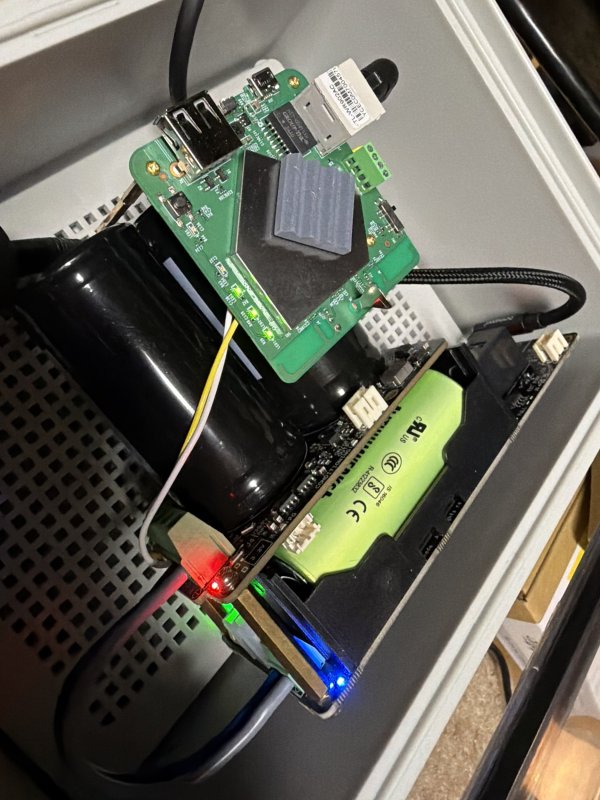
Rubbed a little extra funk on it with Mundorf 16ga Angelique power leads (grey/black between the IanCanada modules) and Mundorf AG 20ga Teflon sheathed solid core wire (white/yellow) between the UcConditioner Pro and the TPLink’s 3.3v input.

IMG_1990.jpeg
 
I like that block for wiring in 3.3V to TPlink....soldering to the test pins was a major PITA
 
  • Love
Reactions: jeremya
Last edited:
Open WRT is needed if you have a version lower than version 4 of the TPlink router. Most of what's available out there now is V.4.
My TPLink and Anker should be delivered tomorrow so I should have it up and running this weekend. But I have to ask; why is it so beneficial as it apparently is? And is it going to improve the SQ of the music on my servers internal SSD as much as streaming?
 
why is it so beneficial as it apparently is?

Operative theory is cutting off all noise over the wire
to the device (as there is no wire) and very low noise generated by the circuitry in question. The battery pack lowers total noise even further by getting rid of an SMPS.

And is it going to improve the SQ of the music on my servers internal SSD as much as streaming?

Lower noise coming into system overall may / should have a beneficial impact on Sound Quality. We look forward to your findings.

I’d chime in with my experience except that I eschewed local storage some time ago — my DIY Extreme server just acts as a glorified streamer now.
 
  • Like
Reactions: MarkusBarkus

About us

  • What’s Best Forum is THE forum for high end audio, product reviews, advice and sharing experiences on the best of everything else. This is THE place where audiophiles and audio companies discuss vintage, contemporary and new audio products, music servers, music streamers, computer audio, digital-to-analog converters, turntables, phono stages, cartridges, reel-to-reel tape machines, speakers, headphones and tube and solid-state amplification. Founded in 2010 What’s Best Forum invites intelligent and courteous people of all interests and backgrounds to describe and discuss the best of everything. From beginners to life-long hobbyists to industry professionals, we enjoy learning about new things and meeting new people, and participating in spirited debates.

Quick Navigation

User Menu

Steve Williams
Site Founder | Site Owner | Administrator
Ron Resnick
Site Owner | Administrator
Julian (The Fixer)
Website Build | Marketing Managersing