REVIEW: The best yet most affordable network switch (TPLink WR902AC)

I haven't' gone down the rabbit hole further with the 3.3v hack, LifePO4 supply, or tried different 5v battery packs. Those days are behind me!

Amen brother. I have a slew of TPLink carcasses here from my failed attempts before I got it to work... but hey, at $30 a nut I just keep cracking them open...
 
  • Like
Reactions: oldmustang
Keith,

I've tried some of these experiments, and can summarize my findings as follows. First, let's define additional scenarios:

E) Home network wifi / wifi to TPLink+Anker -> Taiko Router -> Taiko Switch -> Olympus server
F) Home router -> Olympus Server

My findings:
D >> (i.e. much better than) F — pretty amazing improvement over a straight connection for a sub-$100 solution!
A >> D — the Taiko stack brings different, and more substantial enhancements than the travel router's
E > (i.e. better than) A — the travel router adds SQ on top of the Taiko stack
B < (i.e. not as good as) E — removing the Taiko switch still has a negative impact on SQ

I personally have settled on E (full Taiko stack preceded by battery-powered travel router) as my preferred configuration for my Olympus.

I haven't' gone down the rabbit hole further with the 3.3v hack, LifePO4 supply, or tried different 5v battery packs. Those days are behind me!
I do not have the Taiko stack but I do have a diy clock modded ubiquiti edgerouter 4 and pf clock modded buffalo switch.

Air gapping my PF Ultra modded Buffalo Bs GS2016 with the Tp-link902 AC, connecting the tp-link to my home Wifi (also connected to the modded Edgerouter 4) sounds significantly better than the wired connection (edgerouter connected directly to buffalo).

I opted for the smaller Anker 313 because it comes with a pair and I have two travel routers. One will come out of the edgerouter in wireless ap mode, the other connecting to it in client mode, with output to the buffalo (i am going to conduct this test later, only using one presently).

I intend to use the 2nd Anker to try using my existing subnet isolated network with an air gap. So I would be connecting two Tp-Link902s.

It will be easier to confirm if power to the source wireless AP is impactful to SQ with two equivalent batteries.

In the interim, I have tried tp-link902 directly to server and have come to the same conclusion: Incorporating the Buffalo between the wireless AP and server still adds value.

I swapped out the buffalo for a stock QNAP QSW-2104-25-A to determine how impactful the switch quality itself is, and the Buffalo sounded significantly better than the stock QNAP switch here. I am trying a modded Teradak FMC with ocxo(not pink fuan level) with the same power source as used with the Buffalo and QNAP and this also added value when placed between the travel router and server.

Will report back once I test two travel routers on a dedicated separate subnet. If this brings improvements I will most definitely delve a bit deeper into the mods where deemed necessary. I suspect mods to the travel AP closest to the server will be the only one worthwhile to mod and feed premium power.
 
I do not have the Taiko stack but I do have a diy clock modded ubiquiti edgerouter 4 and pf clock modded buffalo switch.

Air gapping my PF Ultra modded Buffalo Bs GS2016 with the Tp-link902 AC, connecting the tp-link to my home Wifi (also connected to the modded Edgerouter 4) sounds significantly better than the wired connection (edgerouter connected directly to buffalo).

I opted for the smaller Anker 313 because it comes with a pair and I have two travel routers. One will come out of the edgerouter in wireless ap mode, the other connecting to it in client mode, with output to the buffalo (i am going to conduct this test later, only using one presently).

I intend to use the 2nd Anker to try using my existing subnet isolated network with an air gap. So I would be connecting two Tp-Link902s.

It will be easier to confirm if power to the source wireless AP is impactful to SQ with two equivalent batteries.

In the interim, I have tried tp-link902 directly to server and have come to the same conclusion: Incorporating the Buffalo between the wireless AP and server still adds value.

I swapped out the buffalo for a stock QNAP QSW-2104-25-A to determine how impactful the switch quality itself is, and the Buffalo sounded significantly better than the stock QNAP switch here. I am trying a modded Teradak FMC with ocxo(not pink fuan level) with the same power source as used with the Buffalo and QNAP and this also added value when placed between the travel router and server.

Will report back once I test two travel routers on a dedicated separate subnet. If this brings improvements I will most definitely delve a bit deeper into the mods where deemed necessary. I suspect mods to the travel AP closest to the server will be the only one worthwhile to mod and feed premium power.
I've been running the TP Link 902 for about two hours. It's a step up in smoothness, clarity and seems to definitely have a lower noise floor. No drops on 192 or DSD 128 (DOP). I've been running my Aardvark Link from the TP Link to my server so far. Tomorrow I'll substitute a Blue Jeans Cat 6A cable for the link and report back. We're leaving for Christmas week Monday. When I return I should have the QSA stuff I ordered so I'll try one of their Ethernet cables as well. At this point the sound I have now is the best I've heard from this system.
 
View attachment 162829


I recently stumbled upon the parenting milestone of dealing with Gen Alpha slang. My son, when asked to put down his iPad, used language which left me perplexed and uneasy. What is this idiocy and which damn kid did he learn that from? Why can't they just talk in a respectful way and use normal English especially in front of their dad? Later that night, after I calmed down and had 2 glasses of wine, I started researching how to deal with kids and their distorted lingo and learned, much to the realization of my ignorance, that slang can be appropriate and useful among the younger generation in how they communicate.

Which brings me to this review. Just like language I take for granted everyday, for almost three decades I have increasingly gone deeper down the audiophile rabbit hole and religiously believed that "everything matters" -- components must be shielded and grounded from environmental noise, isolated from mechanical vibrations, supplied with the cleaning possible power via cables that minimize interactions with anything else around it. In our collective pursuit of uber excellence in the era of digital streaming, this means dedicated audiophile-grade network cables, routers, switches, servers and streamers floating on isolation platforms and driven by exotic power supplies augmented by equally-exotic power conditioners, fuses and power cords, all sorts of signal isolation, clocks and conversions to make sure those little 1s and 0s are interpreted as perfectly as possible. I drank the Kool-Aid and even contributed towards this effort with my review of the Network Acoustics tempus, and have owned 3 different switches (Innuos, Network Acoustics, and Taiko) and several power supplies in this never-ending pursuit. I would put my listening room in a Faraday cage if it was possible.

What if something came along and just makes you question if all that we have accepted in high-end audio is.... well, maybe not-so-absolute?

Courtesy warning: The rest of this post will be heresy to some audiophiles. It is so against the grain that perhaps I will be dismissed and shunned, and therefore to protect the credibility of other WBF members involved I will defer to their willingness to post on their own. Oh well -- here it is...

First, I cannot claim credit for any of this discovery. A saavy audiophile has a German website with electrical measurements of various switches and found that common mode noise is inherent in physically-connected switches, and that while Wifi can theoretically eliminate this interference, the key is in the implementation: using a low-energy minimalist wireless router in client mode under pure battery power. This was introduced to me by a WBF member and over the past two months an increasing number of us have been trialing this Wifi network setup in our various systems and have found results that I felt necessary to share in the spirit of the audio community.

For background, the incoming Comcast cable goes to my living room where the Motorola modem directly connects to an Orbi Mesh router. This then connects via a switch and in-wall cabling to my listening room where there is another switch -- at this point a QSA-Lanedri ethernet cable goes to my Taiko Audio Extreme Switch or Network Acoustic Tempus switch and a Network Acoustics Muon Pro filter and then my streamer which relies on Roon / Qobuz and sends music to my Lampizator Horizon. This has sounded so enjoyable that I have preferred streaming over locally-stored playback for the past year. While my peers have additional upstream audiophile routers, switches and optical moats, I am absolutely satisfied with this setup and felt I was done. Until this past month.

Instead of all the above, I am now using a $30 TPLink WR902AC wireless router powered by a $50 Anker battery pack to supply streaming data to my server. You read that correctly. This is the kind of device that people use at a coffee shop when working on their laptop... except with some easy software options used to tune it for optimal audio streaming use.*
keithc.just checking . are u listening thru headphone ?
 
  • Like
Reactions: audioblazer
Right on. You had better luck than I, but it might be because I opted for the travel router that supports gigabit. The instructions Keith provided can’t be performed exactly as described. Frustrating as heck so I will likely bail on it.

I did also purchase the recommended device so I will likely try configuring that instead.
Did you ever get this working? 100mbps isnt an issue with Roon and I don't do DSD streaming from a NAS but I would like to know how the 1000mbps version sounds in comparison to the 920AS.
Cheers
 
  • Like
Reactions: matthias
First, a big thank you to Keith for bringing this little gem to our attention. And a 2nd thank you to Keith for providing easily implemented set-up
of the TP Link 902 travel router(TPLR).

Listed below is my baseline digital network:

TP Link(home router)>>>QSA Ethernet cable>>>Taiko router>>>Melco DAC cable>>>Taiko switch*>>>NA Ethernet cable>>>NA Muon Pro
>>>Shunyata Omega X Ethernet cable*>>>Taiko I/O>>>Taiko Olympus

All music is streamed using Quboz. I am currently using the Anker battery recommended by Keith. * indicates Finisar FCLF8522P2BTL transceiver. LPS are used to power all equipment listed above. My complete system can be viewed in my signature.

My initial listening to the TP Link 902 router(TPLR)...I used it by disconnecting the QSA Ethernet cable above and plugging it into the TPLR. I could immediately hear a difference however I was not sure if I could differentiate it from my baseline. My girlfriend obliged and assisted in conducting a blind trial. To my surprise I picked and preferred the TPLR install 3/3 times. She refused further testing. The TPLR sounds more dynamic, improved decay, better bass articulation and separation of voices/instruments. These add up to more interest/involvement in the music.
Mind you these were not significant improvements but immediately noticeable and preferred. For the investment, the value is off the charts good!

I have been listening and testing the TPLR for almost a week. Another trial I conducted was placing the TPLR immediately in front of the Taiko router and then using the Omega X cable into the Taiko I/O. I listened to this set up for approx 2 hours with different tracks.This sounded less dynamic and involving than my baseline. I will conduct further trials over the next couple of weeks by adding or removing the Taiko switch and NA Muon Pro.However, for the time being I will enjoy the addition of the TPLR.

I look forward to reading about and possibly installing better power supplies and cables for the TPLR.
 
To avoid confusion on my above post, I used (and am using) the TP Link 902 travel router(TPLR) by placing it between my TP Link home router and my Taiko switch. The TPLR connects wireless to my TP Link home router and is then connected by the QSA Ethernet cable to the Taiko switch.
Maybe too much TP Link gear?
 
  • Like
Reactions: NaimYourTubes
Did you ever get this working? 100mbps isnt an issue with Roon and I don't do DSD streaming from a NAS but I would like to know how the 1000mbps version sounds in comparison to the 920AS.
Cheers
The 1000mbps version is working with the power supply it came with. Last night I had hoped to listen, while powering it with one of my older Pilot Pro2 batteries. The LED turns blue, then red, and then it goes off. Seems like not enough current to keep it powered. Grrr.

Upon discovering this, I ordered the recommended Anker battery. Hope it can power this thing.
 
You guys are having all the fun while my 902 is delayed again! Now I won’t get it until the 24th. :mad:
 
Firstly, thank you to everyone who has posted in this thread.

Second, I run a 1GBPS down/40MBPS up internet connection, into my Firewalla Gold Plus. This feeds my Netgear Orbi Mesh WiFi network (in AP mode). But the Nucleus Titan was served via ethernet through a few Netgear GS105E & GS108E switches with iFi power supplies. Best I can do in a rental home.

I tried the 902 first, but it offered constant drops. Then the WR1502X with the same issues, just less intense. Drops or router/AP restarts every 20-30 minutes and nothing self-recovered.

Those have been returned and I just set up the BE3600 last night. ECO mode, disabled all USB sharing, etc. Though the first two brought immediate and obvious SQ improvement, the BE3600 started off, cold, better in every area.

After a night of break-in, it's getting smoother and even more spooky 3D, but with no loss of focus. I will not be derailing this thread, but wanted to add another data point.

 
@NaimYourTubes, which specific BE3600? Seems like more than one uses that nomenclature.
 
  • Like
Reactions: NaimYourTubes
Just wondering if you're happy to provide both Firmware Version and Hardware Version as shown below?

https://www.tp-link.com/us/user-gui...r-6-configure-the-router-in-access-point-mode

Much easier to replicate the results if we're following everything to the letter, many thanks.

I use hardware V4 and have latest firmware installed. I configured as an access point with low signal strength, 20mhz, AP isolation, and no short gi boost. You can keep smart DHCP and its server enabled for debugging purpose or turn them off when you're done.

This TP-Link nano router doesn't sound bad for a niche idea to have audiophile grade wifi access point extending from audiophile network switch. I mean with high precision clock modification for reducing network jitter in wifi at least.

I'm still debating with myself if this is worth the effort. Using WiFi access point only might not bring significant improvement for some people. But wireless isolation in client mode do sound quite different.

Regards,
Keetakawee
 
  • Like
Reactions: NaimYourTubes
Firstly, thank you to everyone who has posted in this thread.

Second, I run a 1GBPS down/40MBPS up internet connection, into my Firewalla Gold Plus. This feeds my Netgear Orbi Mesh WiFi network (in AP mode). But the Nucleus Titan was served via ethernet through a few Netgear GS105E & GS108E switches with iFi power supplies. Best I can do in a rental home.

I tried the 902 first, but it offered constant drops. Then the WR1502X with the same issues, just less intense. Drops or router/AP restarts every 20-30 minutes and nothing self-recovered.

Those have been returned and I just set up the BE3600 last night. ECO mode, disabled all USB sharing, etc. Though the first two brought immediate and obvious SQ improvement, the BE3600 started off, cold, better in every area.

After a night of break-in, it's getting smoother and even more spooky 3D, but with no loss of focus. I will not be derailing this thread, but wanted to add another data point.


You have the same experience as me. Glad I am not the only one with Be3600. This is what I posted earlier:


However, I have not given up on WR902AC yet. I want to mod it to get the 3.3v direct. They also need a good bit of burn-in. I also have the 802N on order as well. It will interesting to compare all of them using the same power supply.
 
  • Like
Reactions: NaimYourTubes
You have the same experience as me. Glad I am not the only one with Be3600. This is what I posted earlier:


However, I have not given up on WR902AC yet. I want to mod it to get the 3.3v direct. They also need a good bit of burn-in. I also have the 802N on order as well. It will interesting to compare all of them using the same power supply.
No kidding! You were first to it. Reading your post, that does indeed mirror what I am hearing!
 
  • Like
Reactions: Devg
Those have been returned and I just set up the BE3600 last night. ECO mode, disabled all USB sharing, etc. Though the first two brought immediate and obvious SQ improvement, the BE3600 started off, cold, better in every area.

After a night of break-in, it's getting smoother and even more spooky 3D, but with no loss of focus. I will not be derailing this thread, but wanted to add another data point.

Awesome! Following in yours and @Devg's footsteps I have both the 802N and 3600BE incoming.
Thanks for paving the way.
 
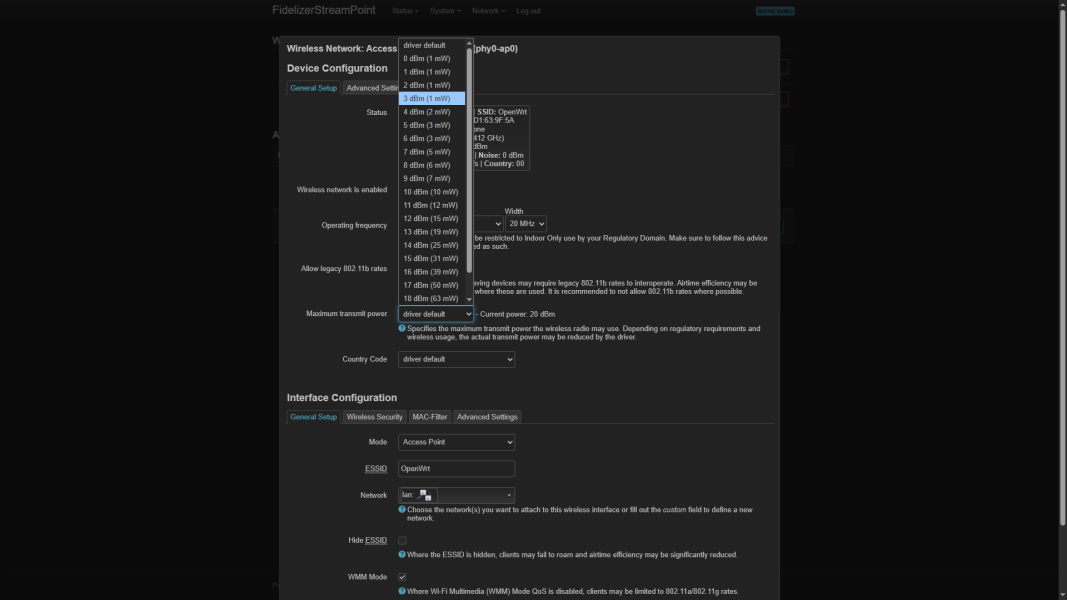
1766187519666.png

Today I flashed OpenWRT firmware and there's a lot more you can customize more than default TP-Link configuration. Feel free to try exploring new possibilities with OpenWRT firmware. This is one example how of you can customize WiFi power down to every dBm and check mW in details.

Regards,
Keetakawee
 
  • Like
Reactions: NaimYourTubes

About us

  • What’s Best Forum is THE forum for high end audio, product reviews, advice and sharing experiences on the best of everything else. This is THE place where audiophiles and audio companies discuss vintage, contemporary and new audio products, music servers, music streamers, computer audio, digital-to-analog converters, turntables, phono stages, cartridges, reel-to-reel tape machines, speakers, headphones and tube and solid-state amplification. Founded in 2010 What’s Best Forum invites intelligent and courteous people of all interests and backgrounds to describe and discuss the best of everything. From beginners to life-long hobbyists to industry professionals, we enjoy learning about new things and meeting new people, and participating in spirited debates.

Quick Navigation

User Menu

Steve Williams
Site Founder | Site Owner | Administrator
Ron Resnick
Site Owner | Administrator
Julian (The Fixer)
Website Build | Marketing Managersing