


Send me DM and then you can WhatsApp meI’m really looking forward to trying XDMS on my Extreme. Any news on when it may be more widely available for beta testing?
I can install XDMS Beta for you this week
Send me DM and then you can WhatsApp meI’m really looking forward to trying XDMS on my Extreme. Any news on when it may be more widely available for beta testing?
Great thanks very much. Have sent an email to support@taikoaudio.com.XDMS Beta is now running on about 25 Extremes now
Every Beta User has noticed a SQ uplift
Send me a DM to put your name down
Definitely a SQ uplift of some degree however imo it isn’t a simple incremental improvement but more of a side-step PLUS improvement. As though we’re now on a different track following in the footsteps of the Olympus.XDMS Beta is now running on about 25 Extremes now
Every Beta User has noticed a SQ uplift
Send me a DM to put your name down
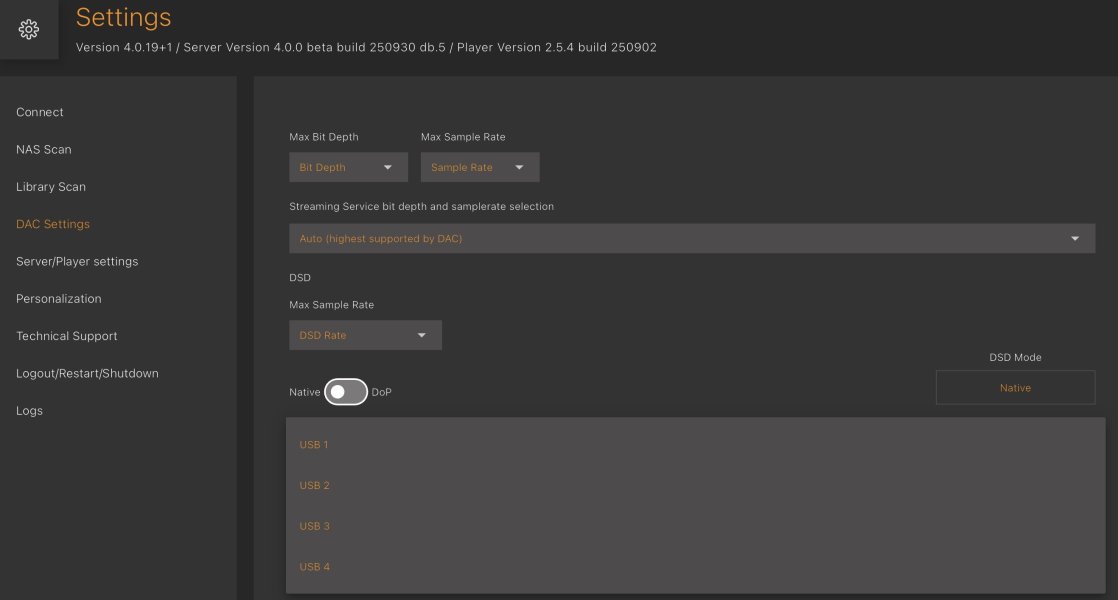

Can anyone enlighten me as to the USB options within XDMS DAC settings? There are listed USB 1/2/3/4 - are these the same as the 4 profiles shown on the Extreme desktop when going in to RVNC viewer? My DAC’s are profile 4 which I have selected already so I don’t quite understand what these settings are in XDMS and how it relates to the normal USB profiles that I have always used.
View attachment 161731

There is no easy way to check which USB profile is active. If in doubt, it is best to simply re-load the desired profile. The procedure is as follows:My understanding is that these USB settings in XDMS do not currently work. So you have to use VNC to make the change, at least for now.
Can you remind us how to check the current setting, and how to change it, via VNC?
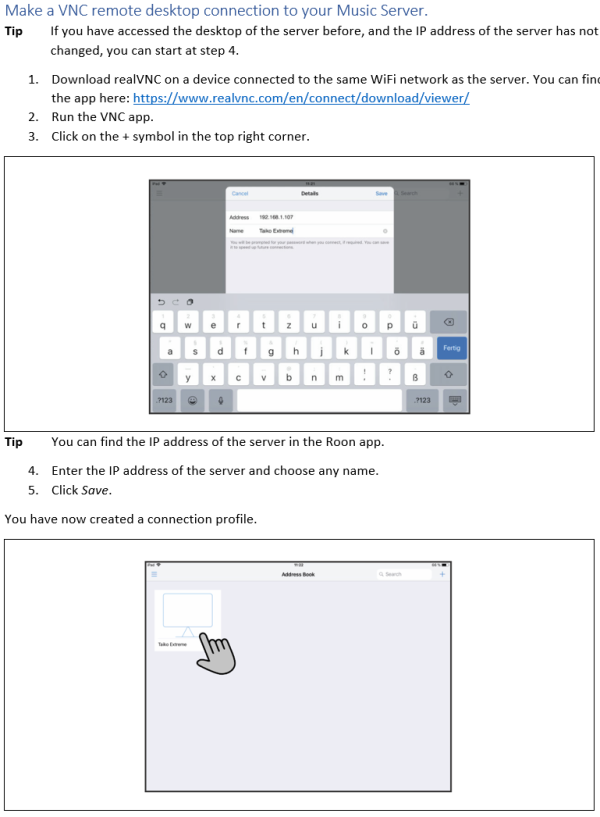
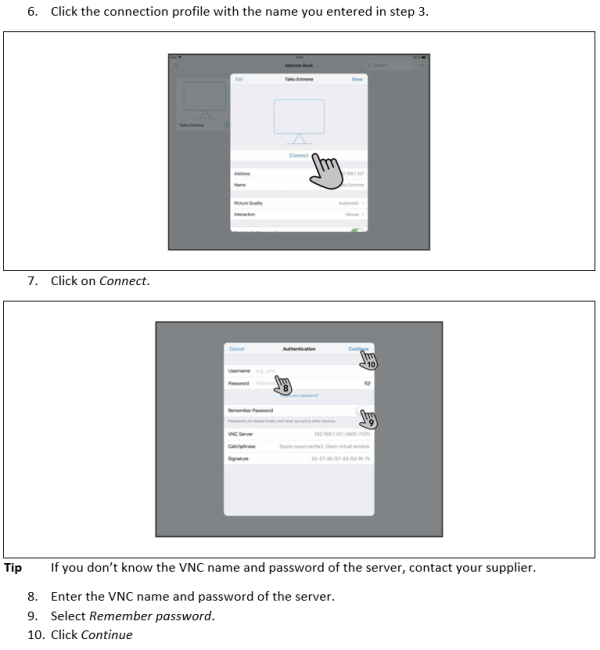
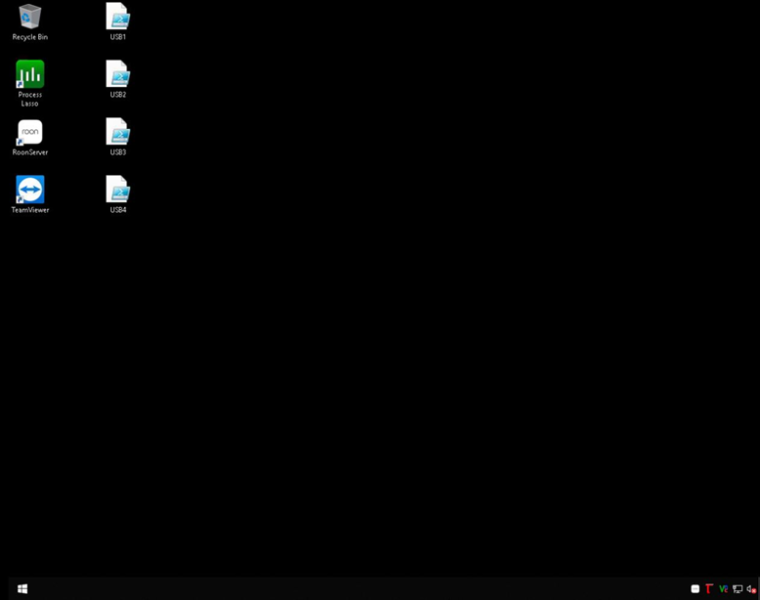
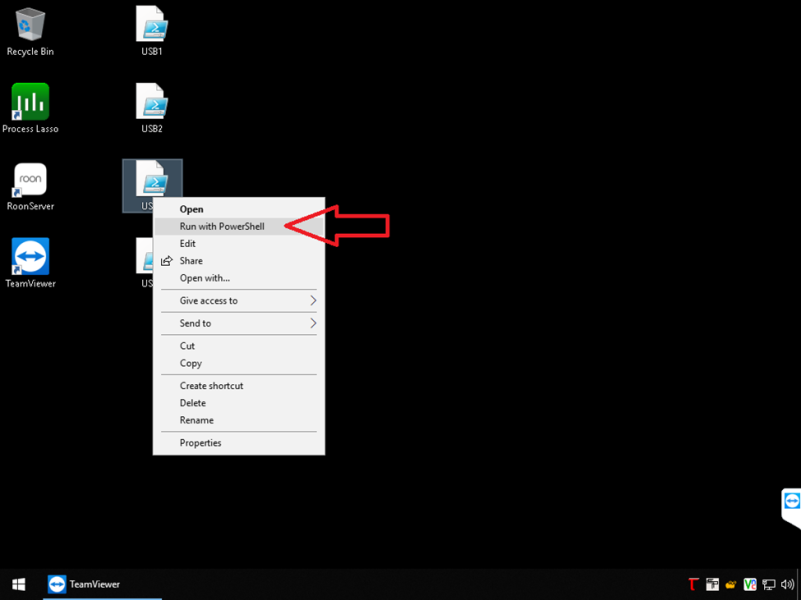
No worries!Thank you, and sorry I should have checked the Support page first!


 www.monoandstereo.com
 furutech.com
So, I take it you have your Apple TVX fed from the Taiko Router, then? No compromise on SQ for the audio with that?Reporting back on the Furutech NCF Clear-Line USB Optimizer in the Extreme's unused "DAC" USB port.
It sounds nice overall, but it's a smoother presentation with slightly less edge and not as airy highs. Some may prefer this. I can go back and forth but overall I think the Extreme sounds better without it.
The real win was when I connected the Furutech NCF to the Taiko Router's USB port. WOW!
There was a very nice improvement in sound and video. Both the Extreme and the ATVX are showing obviously noticeable improvements with the Furutech plugged in. I am using the USB for now and just installed the Ethernet version.
Note that I was not streaming, I was playing locally stored files on the Extreme, yet the improvement was noticeable.
Here's what I noticed:
• more 'energy' and clarity
• very nice highs and lows
• enhanced soundstage localization
• string instruments have an improved tone and resonance
• reduced background noise
• video is sharper and colors looks more saturated, contrast is improved
The difference is not large, but it's definitely a noticeable improvement. You probably already need a low noise floor, low jitter, with good vibration isolation and AC/Grounding to see a difference. The Furutech NCF at about $250 is a no-brainer. You can probably also return it if you don't like it.
Furutech NCF Clear Line Optimizers Review – M & S | Ultimate High-Fidelity
NCF Clear Line - Furutech
No, only benefits to both the ATVX and the Extreme from using the Taiko Router. I did just start powering off the ATVX when I am listening to the Extreme, and vice-versa - can't hurt!So, I take it you have your Apple TVX fed from the Taiko Router, then? No compromise on SQ for the audio with that?
I have an NCF USB Clear Line Optimizer that Im not using. If anyone is interested, feel free to DM me.No, only benefits to both the ATVX and the Extreme from using the Taiko Router. I did just start powering off the ATVX when I am listening to the Extreme, and vice-versa - can't hurt!
Try it on your router!I have an NCF USB Clear Line Optimizer that Im not using. If anyone is interested, feel free to DM me.


 | Steve Williams Site Founder | Site Owner | Administrator |  | Ron Resnick Site Owner | Administrator |  | Julian (The Fixer) Website Build | Marketing Managersing |
