





REVIEW: The best yet most affordable network switch (TPLink WR902AC)

@keithc First off thank you for sharing this with all of us here at WBF, and the instructions were very easy to follow. I just finished setting the my TP Link up in my system and my initial impressions are very positive. I may be eliminating several boxes and power supplies from my system. I have always been a subscriber to the less is more theory in audio. Will be swapping out boxes to determine what is the best combinations for my tastes and systems. Again thank you so much and Merry Christmas.
 
@keithc First off thank you for sharing this with all of us here at WBF, and the instructions were very easy to follow. I just finished setting the my TP Link up in my system and my initial impressions are very positive. I may be eliminating several boxes and power supplies from my system. I have always been a subscriber to the less is more theory in audio. Will be swapping out boxes to determine what is the best combinations for my tastes and systems. Again thank you so much and Merry Christmas.


Congrats! I'm glad it worked for you. What were the noticeable sonic changes in your system?

What was your digital chain before, and what is it now? I think there's much to be discovered as to where to put the TPLink in the chain, what matters before or after it, etc.

And this is just with the TPLink and Anker that you bought off Amazon! Just like other audio products on this site, my guess is that most people just want to buy something and plug it in; only a small fraction of folks would be willing to do significant DIY/modding. As such I hope we can keep this thread focused on the commercially-available WR902AC and power solutions...
 
Since Keith requested me to not share DIY approach with hardware mods, I'll respect his request in this thread and won't disclose how hardware modification will affect this project.

However, I still recommend to pick WR802N model over WR902AC. It doesn't make sense to buy WR902AC and turn off 5GHz and USB output so it can work like WR802N version. You can just buy WR802N model and have 5GHz and USB feature removed by default. It will have less internal noise and sound even better. This can be done on software configuration without hardware changes.

Regards,
Keetakawee
 
Last edited:
  • Like
Reactions: Devg
I had purchased one of the travel routers that can do gigabit due to concerns about what the 100mb rate would do to the user experience.

The limiting factor will actually be use of the 2.5 Ghz radio. What follows are the results of using iPerf3 between my NAS and a laptop connected to the travel router in client mode

[ ID] Interval Transfer Bitrate
[ 5] 0.00-10.01 sec 65.4 MBytes 54.8 Mbits/sec sender
[ 5] 0.00-10.06 sec 64.9 MBytes 54.1 Mbits/sec receiver

After switching to a 5Ghz SSID, the iPerf3 reported:

[ ID] Interval Transfer Bitrate
[ 5] 0.00-10.00 sec 529 MBytes 444 Mbits/sec sender
[ 5] 0.00-10.02 sec 528 MBytes 442 Mbits/sec receiver

I haven’t done any listening comparisons yet but hope to do so soon.
 
  • Like
Reactions: NaimYourTubes
Since Keith requested me to not share DIY approach with hardware mods, I'll respect his request in this thread and won't disclose how hardware modification will affect this project.

However, I still recommend to pick WR802N model over WR902AC. It doesn't make sense to buy WR902AC and turn off 5GHz and USB output so it can work like WR802N version. You can just buy WR802N model and have 5GHz and USB feature removed by default. It will have less internal noise and sound even better. This can be done on software configuration without hardware changes.

Regards,
Keetakawee

I ordered one to compare. Is the 802N using the same chip (or even the same board) with 5G turned off and USB depopped ?
 
I had purchased one of the travel routers that can do gigabit due to concerns about what the 100mb rate would do to the user experience.

The limiting factor will actually be use of the 2.5 Ghz radio. What follows are the results of using iPerf3 between my NAS and a laptop connected to the travel router in client mode

[ ID] Interval Transfer Bitrate
[ 5] 0.00-10.01 sec 65.4 MBytes 54.8 Mbits/sec sender
[ 5] 0.00-10.06 sec 64.9 MBytes 54.1 Mbits/sec receiver

After switching to a 5Ghz SSID, the iPerf3 reported:

[ ID] Interval Transfer Bitrate
[ 5] 0.00-10.00 sec 529 MBytes 444 Mbits/sec sender
[ 5] 0.00-10.02 sec 528 MBytes 442 Mbits/sec receiver

I haven’t done any listening comparisons yet but hope to do so soon.

Yes, 5Ghz will always provide with a better throughput but will it sound better is the key. I had trouble with Roon loading slowly and skipping with WR902AC in client mode connected at 2.4Ghz. I have not done any experiments to reconnect the WR902AC at 5Ghz. The Be3600 connected at same 2.4Ghz has zero issues so far with Roon. For some reason, Roon always like faster bandwidth, both in terms of processing and networking.
 
  • Like
Reactions: NaimYourTubes
I ordered one to compare. Is the 802N using the same chip (or even the same board) with 5G turned off and USB depopped ?

They have different chipset (Wireless N only and N/AC chipset aren't the same). You can open FCC ID to check and compare. They have different implementation so it's also possible some may prefer WR902AC more from the flavor that model is offering, which can happen with every equipment by that logic.

My logic is simple. You buy WR902AC and turn off 5GHz wifi and USB feature to reduce interference. There's WR802N which seems like WR902AC minus 5GHz and USB. So why not give that a try? Just set it up as client mode and it can work right away without additional steps required.

Regards,
Keetakawee
 
  • Like
Reactions: Devg
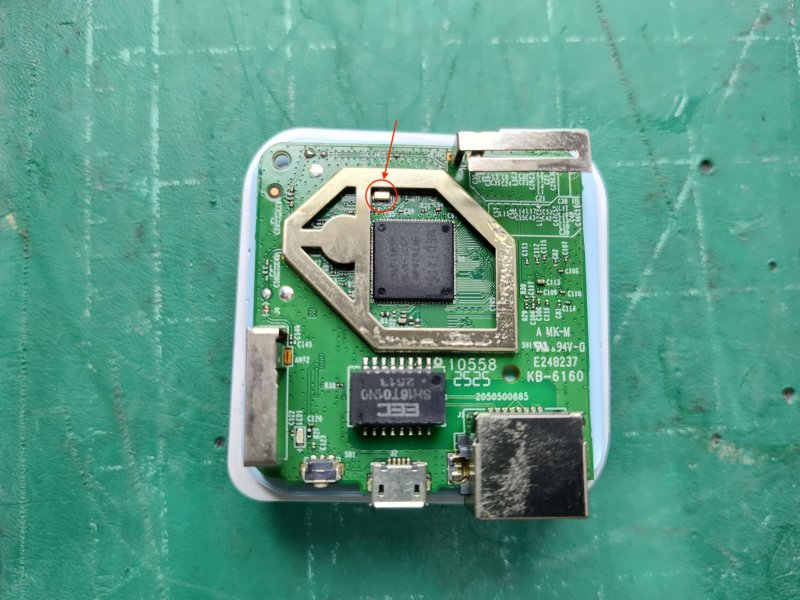
@Windows X is that the clock for the 802N marked by the red arrow ? I can't figure it out from the image. If so, any idea what Mhz its running ?

IMG_20251218.jpg
 
@Windows X is that the clock for the 802N marked by the red arrow ? I can't figure it out from the image. If so, any idea what Mhz its running ?

View attachment 163262

Yeah that's the clock around the edge. It's 40MHz which is WiFi clock used in some models. Some routers I modded have 2x40MHz too. This WR802N uses only one clock. I grilled the bracket and opened another side and found only chip inside.

WR902AC seems to have two clock modules. I can't see for sure but it could be either 25MHz + 40 MHz or two of 40MHz clock modules. I saw routers using both scenarios before. At the end of the day, it's about sound we hear and if turning off 5GHz helps a lot, using one without 5GHz might get even better, just like how some people tried 100mbps port and prefer over 1-10Gbps.

Regards,
Keetakawee
 
Yes, 5Ghz will always provide with a better throughput but will it sound better is the key.
I can’t imagine it sounding better. For me though what the TL-WR1520X will be measured against is the NA tempus. I have opted to allow my audiophile membership card to be revoked because I refuse to return to the compromised user experience I had for years when I used a 100mb switch.
 
  • Like
Reactions: Republicoftexas69
hey folks, interesting thread here. thanks to keith for starting it off.

i have difficulty putting this all in context as not all the relevant information is given, so maybe
i can request some clarifications here and perhaps this can be reported as well in future posts.

1. are you playing local files or streaming?
2. if local files, what is the file format (wav, flac, dsd)? i've found local wav files sound clearly better than local flac or streaming flac. YMMV

here is my experience so far. it took only 5 minutes or less to set up the tplink902/anker but much longer to stop accidentally pulling out DC power supply cables while swapping ethernet cables from my home lan to the tplink (and back again). once i stopped disabling parts of my system, all was good.

my system has a taiko extreme fed by the taiko router and taiko switch, so i've already got some heavy duty cleanup of the ethernet into the streamer. in a short comparison (more to come), i found the tplink to further lower the noise floor and give a greater sense of air and delicacy. while not as big an improvement as when first adding the taiko router/switch combo, the tplink still adds something further. note that this is for playing local WAV files only. i have not yet tested with streaming qobuz where the music would traverse the ethernet connection, wired or wireless.

for a baseline, my experience with both the taiko router and taiko switch presented significant improvements playing back local WAV files and i would not want to be without them in my system. presumably this is due to less traffic (router sublan blocks other home lan traffic from reaching the extreme) and a cleaner ethernet signal (where the switch both cleans up the signal and, perhaps more important, passes the ethernet signal via direct access cable on an spf input, which generates less noise than a normal ethernet receiver). the fact that upstream processing can improve local file playback blows my mind but its real and repeatable.

tomorrow i'll be installing a tplink/anker bridge on a friend's system where the tplink connection will go directly into his extreme (no taiko router or switch). we will test both local files and streaming.

lastly, there have been a few comments suggesting that nothing upstream from the tplink would impact sound due to the wifi isolation. however, i believe that having an isolated sublan (before or after the tplink) to reduce traffic seen by the tplink should still be a valid, right?
 
i believe that have an isolated sublan (before or after the tplink) to reduce traffic seen by the tplink should still be a valid, right?
Yes because an isolated VLAN will reduce traffic if properly configured. The tplink will pass all the traffic unabated.
 
  • Like
Reactions: cat6man
Yeah that's the clock around the edge. It's 40MHz which is WiFi clock used in some models. Some routers I modded have 2x40MHz too. This WR802N uses only one clock. I grilled the bracket and opened another side and found only chip inside.

WR902AC seems to have two clock modules. I can't see for sure but it could be either 25MHz + 40 MHz or two of 40MHz clock modules. I saw routers using both scenarios before. At the end of the day, it's about sound we hear and if turning off 5GHz helps a lot, using one without 5GHz might get even better, just like how some people tried 100mbps port and prefer over 1-10Gbps.

Regards,
Keetakawee

I haven't played with any wifi chips in the past but at least the 40Mhz is an easy multiplier on the ref. If I like the 802N over the Be3600 or 902AC, I will be tempting to mod the clock as well. However, 802N is also limited to 100mbps, similar to 902AC, and the only issue to be seen if slow loading time with Roon still exist.
Is modding for 3.3v easy on this ?
 
lastly, there have been a few comments suggesting that nothing upstream from the tplink would impact sound due to the wifi isolation. however, i believe that having an isolated sublan (before or after the tplink) to reduce traffic seen by the tplink should still be a valid, right?

In theory, yes. In my situation I have two networks - home and audio. The audio network is all wired consisting of only two device - music server and NAS. The home network obviously has the wifi and other wired devices connected. If I had to connect the Tplink client to the audio network, I would need another wifi on the audio network as well. When I got the Tplink, I completely bypassed the audio network and connected my music server to the Tplink which connects to the home network and reconnected my NAS to the home network as well. This surpassed the sound quality over the isolated network I had for audio. I mighted try later to get another wifi setup for the audio network and reconnect the Tplink to the audio wifi.
 
Last edited:
  • Like
Reactions: cat6man
I haven't played with any wifi chips in the past but at least the 40Mhz is an easy multiplier on the ref. If I like the 802N over the Be3600 or 902AC, I will be tempting to mod the clock as well. However, 802N is also limited to 100mbps, similar to 902AC, and the only issue to be seen if slow loading time with Roon still exist.
Is modding for 3.3v easy on this ?

Well, only you will know what you will like more. I've been modding a few network switches and routers for a long while, probably over a thousand combined already. And sometimes the best one had to go due to ethernet cable mismatched.

As for Roon issue, I'm not sure how current version Roon will work under 100mbps now. It seems its network protocol is designed to work with 8 conductors on 1gbps. Using 100mbps will be limited to transmit and receive on 4 wires which may not send enough for multiple devices in network that work with Roon.

Regards,
Keetakawee
 
hey folks, interesting thread here. thanks to keith for starting it off.

i have difficulty putting this all in context as not all the relevant information is given, so maybe
i can request some clarifications here and perhaps this can be reported as well in future posts.

1. are you playing local files or streaming?
2. if local files, what is the file format (wav, flac, dsd)? i've found local wav files sound clearly better than local flac or streaming flac. YMMV

here is my experience so far. it took only 5 minutes or less to set up the tplink902/anker but much longer to stop accidentally pulling out DC power supply cables while swapping ethernet cables from my home lan to the tplink (and back again). once i stopped disabling parts of my system, all was good.

my system has a taiko extreme fed by the taiko router and taiko switch, so i've already got some heavy duty cleanup of the ethernet into the streamer. in a short comparison (more to come), i found the tplink to further lower the noise floor and give a greater sense of air and delicacy. while not as big an improvement as when first adding the taiko router/switch combo, the tplink still adds something further. note that this is for playing local WAV files only. i have not yet tested with streaming qobuz where the music would traverse the ethernet connection, wired or wireless.

for a baseline, my experience with both the taiko router and taiko switch presented significant improvements playing back local WAV files and i would not want to be without them in my system. presumably this is due to less traffic (router sublan blocks other home lan traffic from reaching the extreme) and a cleaner ethernet signal (where the switch both cleans up the signal and, perhaps more important, passes the ethernet signal via direct access cable on an spf input, which generates less noise than a normal ethernet receiver). the fact that upstream processing can improve local file playback blows my mind but its real and repeatable.

tomorrow i'll be installing a tplink/anker bridge on a friend's system where the tplink connection will go directly into his extreme (no taiko router or switch). we will test both local files and streaming.

lastly, there have been a few comments suggesting that nothing upstream from the tplink would impact sound due to the wifi isolation. however, i believe that having an isolated sublan (before or after the tplink) to reduce traffic seen by the tplink should still be a valid, right?
Thanks for taking the time to post about this, Marty. I've been in touch with Keith and he's been very helpful.

While I'm waiting for my Anker battery pack to arrive I've been considering how best to test the TP Link/Anker combo and where to place it in the system.

Two possibilities occur to me --

TP Link set to receive Wifi from my home Wifi broadcast > wired ethernet from TP Link to Taiko router > DAC cable > Taiko switch > DAC cable > Olympus.

Or,

Taiko router WAN port wired ethernet from home LAN > Taiko router broadcasting a dedicated audio Wifi signal for wireless control point devices (iPad, MacBook Air) > TP Link Wifi linked to Taiko router Wifi dedicated audio broadcast > copper ethernet from TP Link to SFP adapter > Olympus.

I see possible pros and cons to each configuration.

Steve Z
 
  • Like
Reactions: keithc
tomorrow i'll be installing a tplink/anker bridge on a friend's system where the tplink connection will go directly into his extreme (no taiko router or switch). we will test both local files and streaming.

Awesome -- excited to hear how this A/B goes.

I see possible pros and cons to each configuration.

Thanks Steve for so clearly identifying the two options. Definitely agree and I think several Olympus folks are doing the same.

If it is not too troublesome ("in the name of science!" ;) ) I'm hoping someday it would be possible to compare:

A) Baseline: Home network -> Taiko Router -> Taiko Switch -> Olympus/Extreme (all wired),
B) Home network wifi / wifi to TPLink+Anker -> Taiko Router -> server, (what you suggested above but without the Switch)
C) Home network -> Taiko Router then wifi/wifi to TPLink+Anker -> Server (what you suggested above),
D) Home network wifi / wifi to TPLink+anker -> Server (see how the TPLink isolation alone compares to the Taiko front end).

Keith
 
  • Like
Reactions: oldmustang
TP Link set to receive Wifi from my home Wifi broadcast > wired ethernet from TP Link to Taiko router > DAC cable > Taiko switch > DAC cable > Olympus.

This is exactly what I finally settled on, but I will be curious to see what you find with the second approach, which I did not try. I do have a suspicion and rationale as to which will sound better, but I learned long ago that network tweaks are full of surprises.

Having spent an unholy amount of time and effort in the past, deep in the depths of the network tweaking rabbit hole, :) this time I'm keeping it simple!
 
After experimenting with WR802N tonight, I think I found the best way to make use of this in my system now. To evaluate this effectively, I'm using $5 ethernet cable with this wifi router and compare it to wifi from modem router provided by ISP.

After applying modification, I tried client mode configuration at my friend's place who modified the router with me. He didn't like the sound on client mode and it got better again after switching back to his modified network switch.

I also tried client mode again at my place and it didn't bring successful improvement in my system as I did try on WR702N model before. However, access point mode seems to bring more significant improvement on WR802N model.

I'm not sure whether it's from having modification too or it's because WR802N has dual antenna receiver block which are also bigger than WR702N and WR902AC, it did sound better than last time I tested.

So, I did further into router configuration and changed operation mode to bg only. This will allow wifi to perform in legacy mode running at lowest possible latency. You can disable WMM and allow packets to be sent without QoS.

So the best use of this router in scenario with audiophile network switch will focus on leveraging wireless connection to low powered router with low jitter/latency improvements. You can connect this router with network switch to extend audiophile grade wifi access point.

This way, you will reduce wifi workload on main modem router on ISP. If you setup external wireless network in house, this can work as low noise access point with isolation and designed for low latency operations.

Anyway, please keep in mind that using low powered strength and bg mode only will limit wifi strength and bandwidth. This configuration is good for using this router as an access point for single isolated device connection.

So, this ends up being something I can approve with at the end. Thank you keithc for bringing up this thread to raise awareness about wireless network improvement in What's best forum community and I hope wifi improvement will prosper in 2026. :)

Regards,
Keetakawee
 
Last edited:
  • Like
Reactions: keithc
Awesome -- excited to hear how this A/B goes.


Thanks Steve for so clearly identifying the two options. Definitely agree and I think several Olympus folks are doing the same.

If it is not too troublesome ("in the name of science!" ;) ) I'm hoping someday it would be possible to compare:

A) Baseline: Home network -> Taiko Router -> Taiko Switch -> Olympus/Extreme (all wired),
B) Home network wifi / wifi to TPLink+Anker -> Taiko Router -> server, (what you suggested above but without the Switch)
C) Home network -> Taiko Router then wifi/wifi to TPLink+Anker -> Server (what you suggested above),
D) Home network wifi / wifi to TPLink+anker -> Server (see how the TPLink isolation alone compares to the Taiko front end).

Keith

Keith,

I've tried some of these experiments, and can summarize my findings as follows. First, let's define additional scenarios:

E) Home network wifi / wifi to TPLink+Anker -> Taiko Router -> Taiko Switch -> Olympus server
F) Home router -> Olympus Server

My findings:
D >> (i.e. much better than) F — pretty amazing improvement over a straight connection for a sub-$100 solution!
A >> D — the Taiko stack brings different, and more substantial enhancements than the travel router's
E > (i.e. better than) A — the travel router adds SQ on top of the Taiko stack
B < (i.e. not as good as) E — removing the Taiko switch still has a negative impact on SQ

I personally have settled on E (full Taiko stack preceded by battery-powered travel router) as my preferred configuration for my Olympus.

I haven't' gone down the rabbit hole further with the 3.3v hack, LifePO4 supply, or tried different 5v battery packs. Those days are behind me!
 
Last edited:

About us

  • What’s Best Forum is THE forum for high end audio, product reviews, advice and sharing experiences on the best of everything else. This is THE place where audiophiles and audio companies discuss vintage, contemporary and new audio products, music servers, music streamers, computer audio, digital-to-analog converters, turntables, phono stages, cartridges, reel-to-reel tape machines, speakers, headphones and tube and solid-state amplification. Founded in 2010 What’s Best Forum invites intelligent and courteous people of all interests and backgrounds to describe and discuss the best of everything. From beginners to life-long hobbyists to industry professionals, we enjoy learning about new things and meeting new people, and participating in spirited debates.

Quick Navigation

User Menu

Steve Williams
Site Founder | Site Owner | Administrator
Ron Resnick
Site Owner | Administrator
Julian (The Fixer)
Website Build | Marketing Managersing